
On our five websites Odoo is reachable from the open internet, and that is not an exception but the normal case: anyone who runs an offer, a shop or a customer login has a public server. A single vulnerable password, a forgotten configuration file or an overly generous permission is enough to turn a public server into an open one.
This article shows how to secure Odoo 19 properly — not with a single measure, but with several layers that complement one another: firewall and reverse proxy, our open-source module Web RBL, two-factor authentication, password policy and permissions — and which attack attempts each of them actually intercepts. At the end there is a step-by-step guide with which any Odoo installation of your own can be brought up to the same standard.
Contents of this article
- Defence in depth: why one measure is never enough
- Layer 1: Firewall and reverse proxy
- Layer 2: Web RBL — the bridge to the firewall
- Layer 3: Securing Odoo itself (2FA, password policy, permissions)
- Layer 4: Database and operations
- The login path as a whole
- Attack scenarios and how to counter them
- Step-by-step guide
- Frequently asked questions
Defence in depth: why one measure is never enough
Every single security measure has a gap. A firewall does not see what happens in an Odoo login form. A strong password does not help if it has already been stolen elsewhere. A permission structure is no use against an attacker who has not even logged in yet. The principle that closes these gaps is called defence in depth: several independent layers, each of which could be bypassed on its own — but not all of them together.
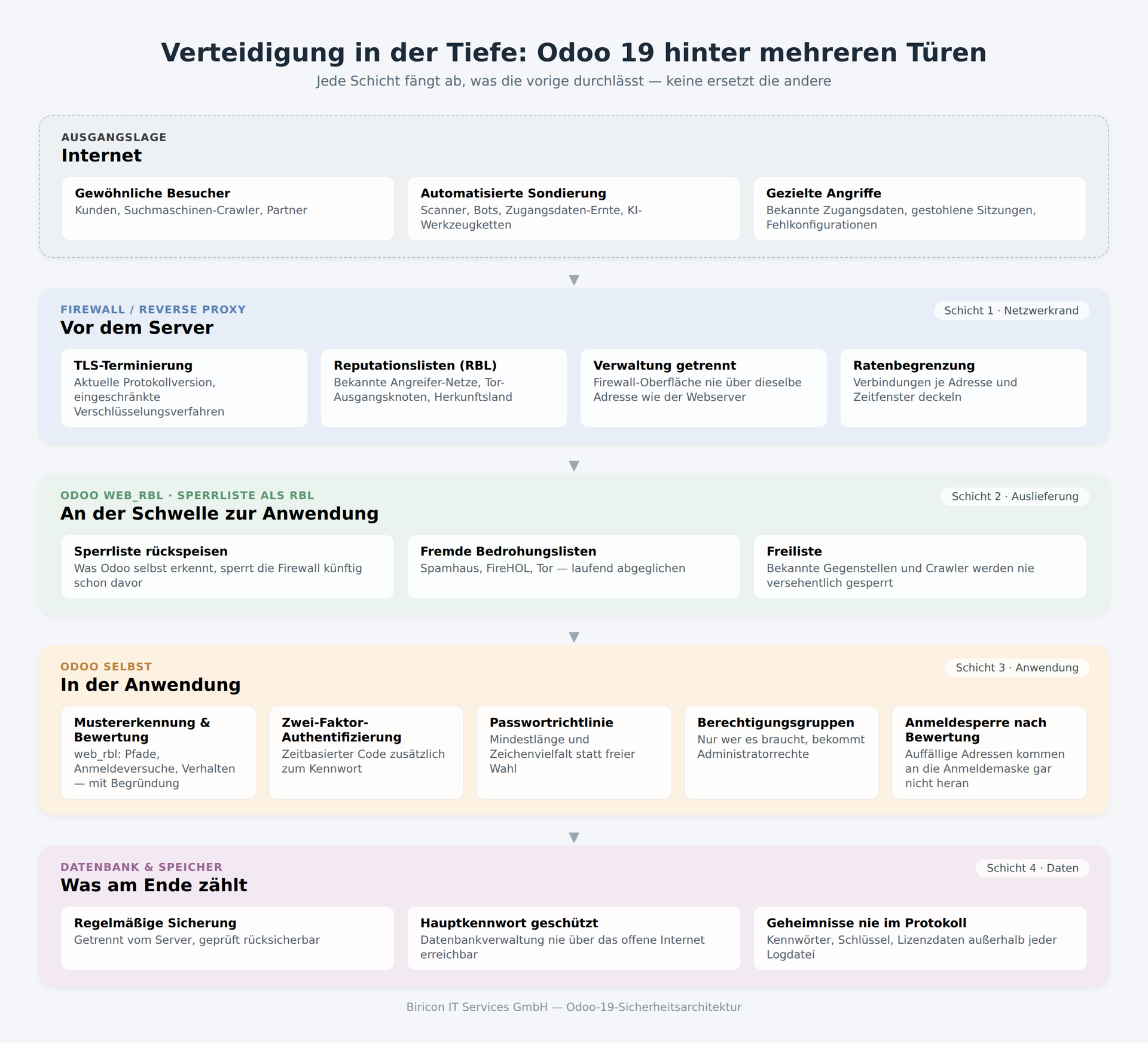
At our company there are four layers, each with a different task:
- Firewall / reverse proxy — keeps out anything obviously malicious before it even reaches the server
- Web RBL — connects both sides: Odoo learns from its own application log what the firewall cannot see at all, and feeds it back to the firewall
- Odoo itself — two-factor authentication, password policy, permissions, session management
- Database & operations — backup, access protection for the administration, secrets kept out of every log
The following sections go through each layer individually.
Layer 1: Firewall and reverse proxy
The firewall is the first instance to see a request, and the only one that can keep an attacker away from every service on the server — not just from the website, but also from the mail server, the VPN access and the management interface itself. What is sensibly activated at this point depends on the vendor, but the building blocks are the same for OPNsense, pfSense, HAProxy, FortiGate, Sophos or Check Point:
| Function | What it helps against |
|---|---|
| Current TLS version and restricted encryption methods | Eavesdropping on and manipulation of the connection; outdated methods have been considered broken or weak for years |
| Reputation and origin lists (RBL) | Known attacker networks, Tor exit nodes, entire countries without customers of your own — see below |
| Rate limiting per address | Password guessing and directory scanners that make dozens of requests within seconds |
| Separation of management and data traffic | The firewall interface itself must not be reachable via the same address as the public website |
| IDS/IPS (intrusion detection/prevention) | Known attack patterns at network level, regardless of which application is running behind |
| Automatic security updates for the firewall itself | An unpatched firewall is no longer a firewall, but an additional target |
RBL lists: the standard way in which reputation is delivered
RBL stands for Real-time Blackhole List, a term from the mail world: one address per line, retrievable over HTTP, reloaded regularly. Practically every firewall can read such a list and build rules from it — OPNsense and pfSense as URL Table Alias, HAProxy as an ACL file, FortiGate as External Block List, Palo Alto as External Dynamic List, Cisco, Sophos, Juniper and MikroTik with their own names for the same principle.
This is exactly where our own module comes in — and exactly where the second layer begins.
Layer 2: Web RBL — the bridge between application and firewall
A firewall sees packets, not application logic. It does not know that a request for /xmlrpc/2/common is a login attempt, that twenty different paths in fourteen seconds mean a scanner, or that an address has just successfully guessed a password. Only Odoo itself knows all of that. Web RBL, our own open-source module (AGPL-3), makes this knowledge usable — for Odoo itself and, delivered as an RBL list, for the firewall in front of it as well.
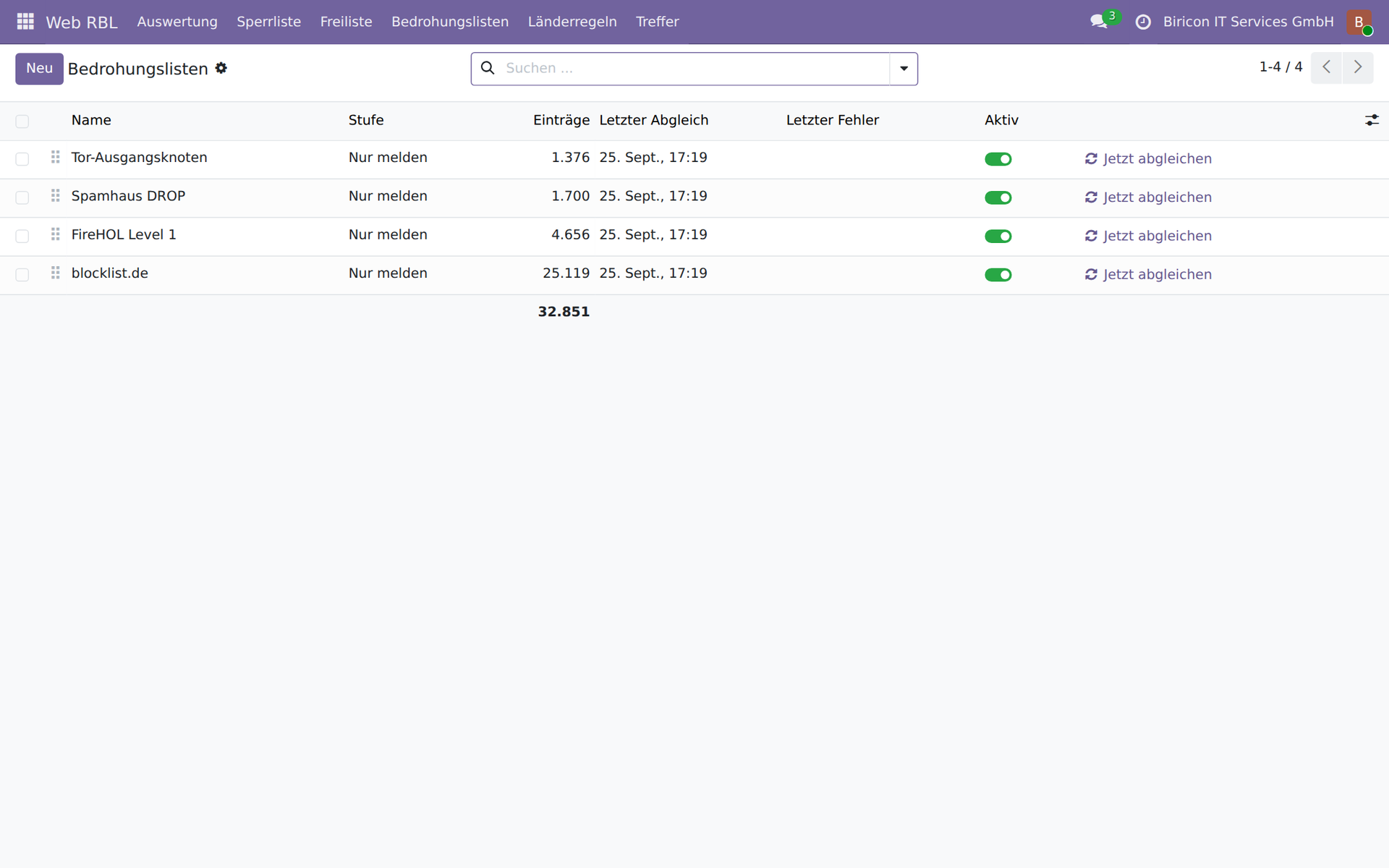
Threat lists continuously synchronised, each with its own level.
A brief summary of what is described in detail in the previous article:
- Pattern detection in paths:
.envfiles,.gitdirectories, configuration files, WordPress and PHP probes, path traversal, command execution via new AI interfaces - Login defence that counts across restarts — unlike Odoo's own counter, which lives in working memory
- Scoring of every address from 0 to 100, with the justification in plain language
- Misconfigurations (QNAP, Autodiscover, Synology) are recognised and never blocked, because a block does not fix the fault but merely hides it
- Third-party threat lists such as Spamhaus, FireHOL and Tor exit nodes, continuously synchronised
- Allowlist for addresses that should never be blocked
Two properties are particularly important for this article, because they are directly connected with the firewall and with login.
A sluggish list is a list you can trust
The allowlist — addresses that are never blocked, such as your own site connections — as a rule changes rarely. That is precisely its value, not its flaw: when a quiet list barely moves over days, every rare change stands out immediately. The daily automatic update does not exist because a lot would change, but so that the rare change does not have to be added by hand — and that is exactly the point at which one forgets it. One of our own misconfigurations last month came to light in exactly this way: not through many events, but through the one that nobody knew about, until a customer's QNAP web API was wrongly blocked. Since then QNAP has been on the list of misconfigurations that are never blocked, only reported.
Login is the place a firewall does not see
A firewall can block an address. It cannot know whether a login succeeded, and certainly not whether it came from an address that had been searching for credentials shortly before. Web RBL can: a score above an adjustable threshold prohibits login altogether, and a successful login from a conspicuous address is reported — that is the link to the next layer.
Layer 3: Securing Odoo itself
Two-factor authentication: a second secret that cannot be reused
The biggest problem with passwords is not their quality, but their reuse. A password that was stolen from another service works just as well with us, as long as it is the same one. Two-factor authentication (2FA, also called TOTP) counters this with a second secret: a six-digit code that changes every thirty seconds and is calculated from a secret known only to your own smartphone. A stolen password alone is then no longer enough.
Odoo 19 Community has this built in — as an installable module, Two-Factor Authentication (TOTP), supplemented by an email fallback option. Each user sets it up for themselves, via QR code, with any common authenticator app:
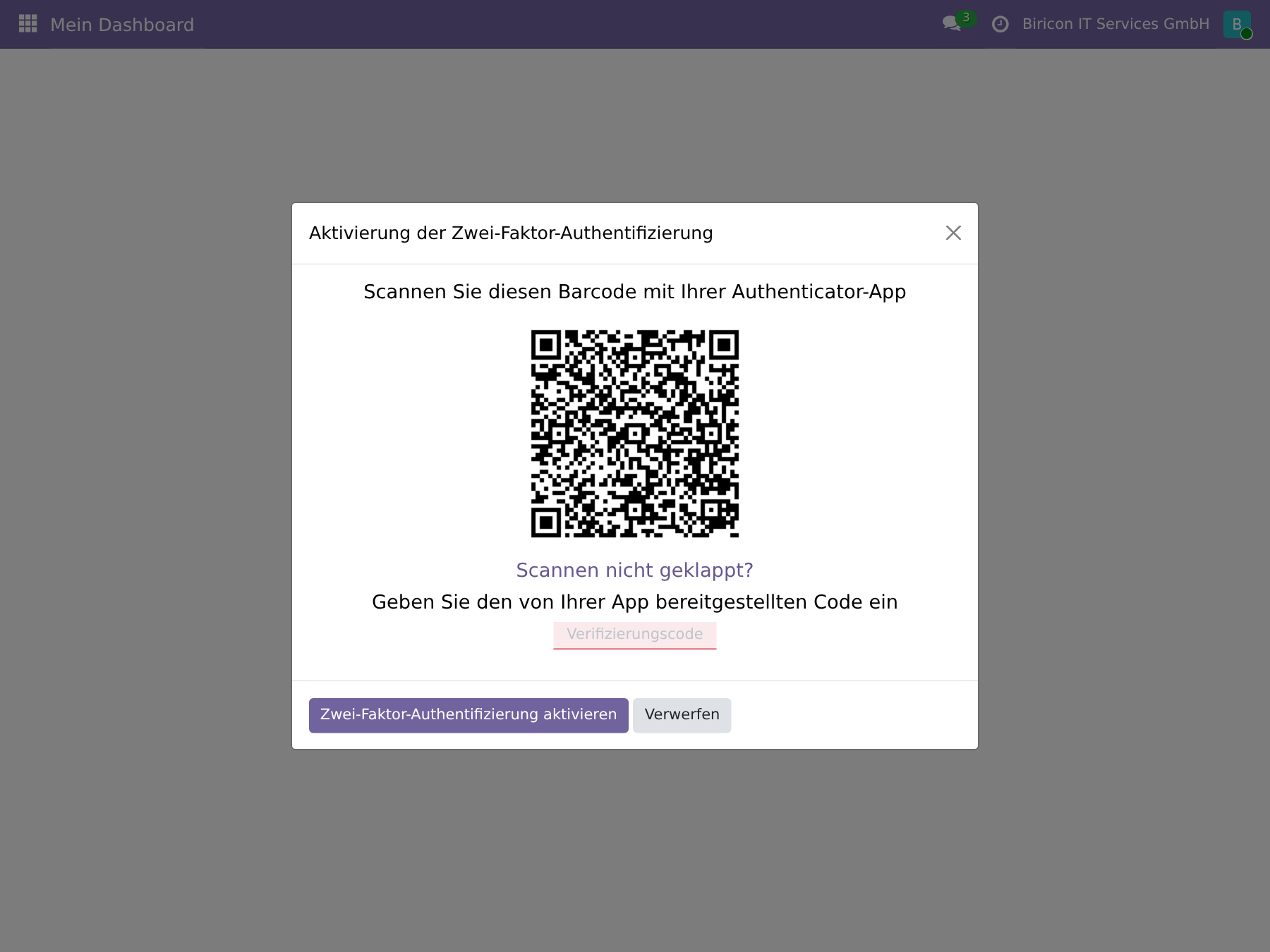
The setup: scan the QR code, confirm the six-digit code once, done.
On its own, however, that only helps those who set it up for themselves — and experience shows that without compulsion they remain the minority. Odoo therefore has an enforcement policy: either for employees only (internal users) or for everyone, portal users included. Without a second secret set up, nobody gets past the login form any more without at least confirming by email code.
Password policy: a minimum length cannot be taken for granted
Without an additional module, Odoo Community relies on no minimum length for passwords — a user can set a password of three characters if nobody stops them. The Password Policy module closes exactly this gap: a minimum length that is enforced on the server side, not merely suggested in the browser. Anyone who wants more — an enforced expiry period, a history against reuse — needs an OCA or third-party module for it; the Community edition is deliberately kept lean.
Permissions: only those who need it get access
Odoo separates three levels out of the box: portal users (only their own customer or supplier portal), internal users (the backend, with rights per application) and administrators (unrestricted access including technical settings). The most common mistake is not a password that is too weak, but an administrator role granted too generously: someone who only has to create invoices does not need access to the system settings.
Two principles carry most of the load:
API keys instead of passwords: every external integration (accounting software, time tracking, your own scripts) gets its own API key that can be revoked at any time, never the user password.
Both can be checked in the same view in which two-factor authentication is set up:
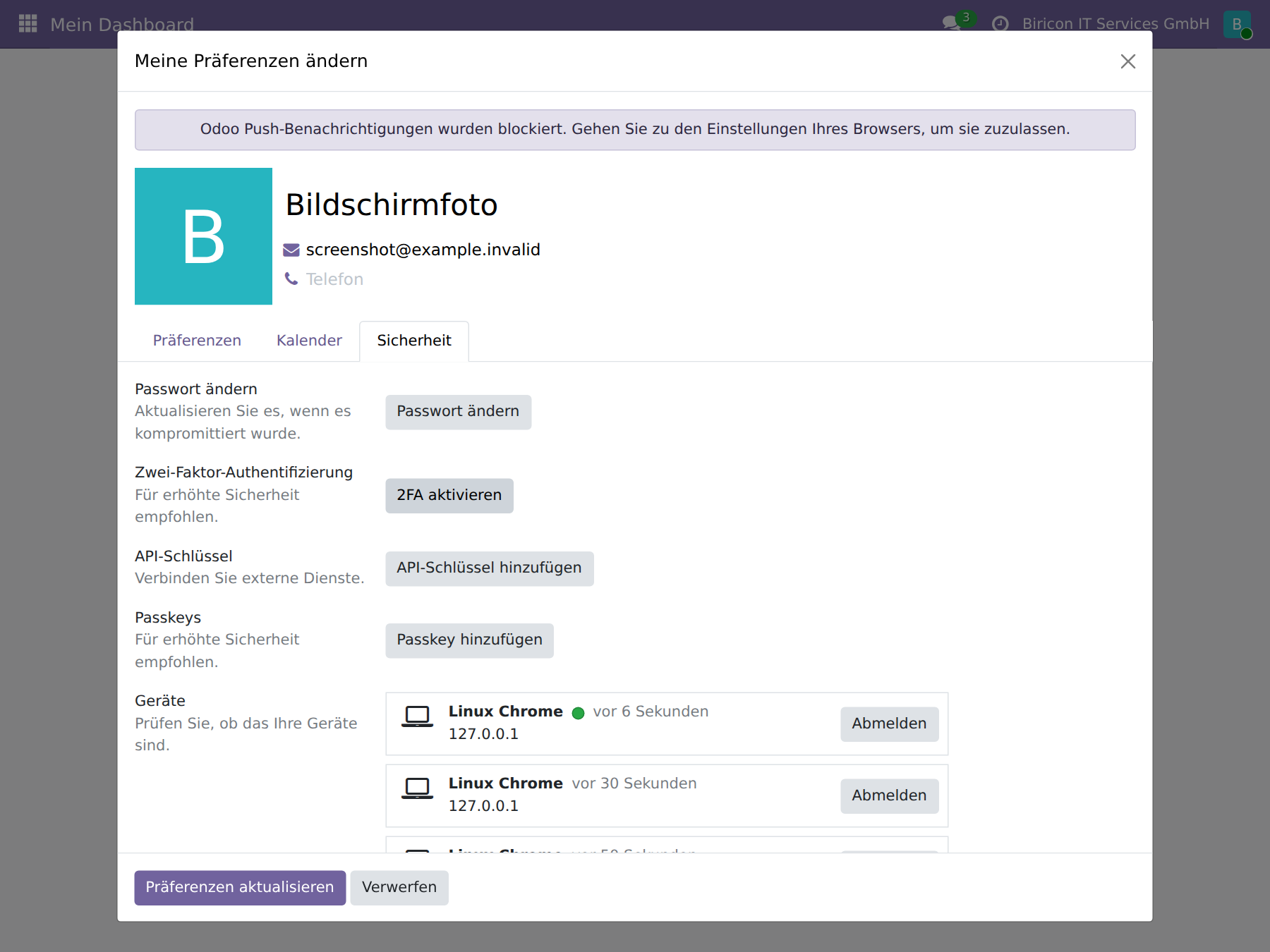
One overview, four levers: password, second factor, API keys, logged-in devices.
Sessions and devices: who is logged in right now
The same view also shows which devices an account is currently logged in from — and allows you to log out a single one or all of them at once. After a lost laptop or the suspicion of a compromised password this is the quickest effective step: the session ends immediately, regardless of whether the password has already been changed.
Layer 4: Database and operations
The fourth layer is the least visible and at the same time the most unforgivable, because a mistake here can undo everything built up before.
/web/database/manager Odoo offers an interface with which databases can be created, backed up, restored and deleted — protected only by a single master password. This interface should be reachable internally only, or switched off entirely.
- Regular, verified backups, stored separately from the server itself. A backup that has never been restored is a supposition, not a backup.
- Secrets belong in no log file. Passwords, API keys, licence data — anyone who writes their own extensions should treat them like the master password itself: log them nowhere, not even “just for debugging”.
- Keep modules up to date, third-party modules above all. Free add-on modules (OCA and others) naturally lag behind new Odoo versions; before any installation it is worth checking which dependencies come along automatically.
The login path as a whole
The four layers do not work one after the other in separate rooms, but on the same request, step by step. This is clearest using a login as an example:
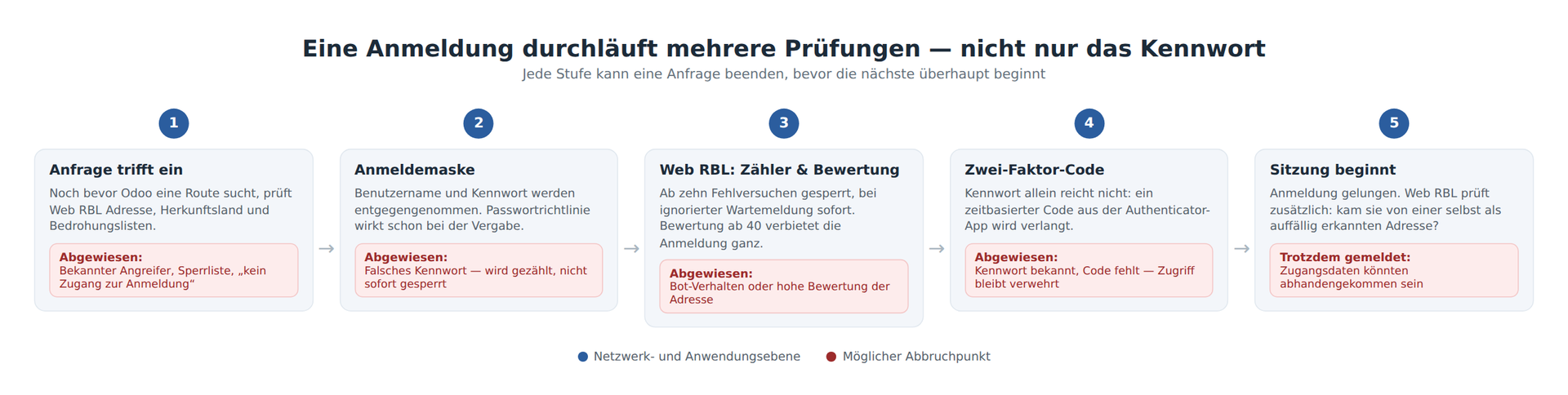
Five places at which a malicious request can end before it reaches the actual target — and only one at which a legitimate user passes them all.
Attack scenarios and how to counter them
The following overview assigns real attack patterns to the layers that actually stop them. Several of them are not theory, but our own observations from seventeen days of real traffic on our five websites.
| Attack scenario | How it works | What stops it |
|---|---|---|
| Password guessing | A script tries hundreds of combinations against the login form or XML-RPC | Firewall rate limiting, Web RBL counter across restarts, block after ten attempts, immediate block when a wait message is ignored |
| Reused credentials stolen elsewhere | The attacker already knows the username and password — from another, hacked service | Two-factor authentication stops the login despite a correct password; Web RBL additionally reports a successful login from a conspicuous address |
| Search for forgotten secrets | Automated requests for .env, .git, cloud access keys — in our case 57,721 requests in seventeen days for .env alone |
Web RBL blocks on the first hit; the firewall then receives the address as an RBL entry for all other services too |
| Directory and path scanners | Dozens of invented paths within a few seconds, in search of forgotten applications | Behaviour detection: many error pages, hardly a hit, in a short time — regardless of whether the path matches a known pattern |
| Misconfigured device of your own | A sync client or an email program points to the wrong address by mistake and knocks every minute | Recognition as a misconfiguration rather than an attack, ticket instead of block — a block would not fix the fault, only postpone it |
| Automated harvesting of mandatory information | A harvester retrieves imprint pages under foreign spellings, often in preparation for a wave of warning letters | The canonical path always stays reachable (legally necessary), foreign spellings are recognised and reported or blocked |
| Lost or stolen device | A logged-in notebook or mobile phone falls into the wrong hands | Session overview with immediate logout of all devices, regardless of the password |
| Internal permission set too broadly | A user account with more rights than necessary is compromised or misused | Least necessary privilege per application limits the damage from the outset to what the account really needs |
| Misuse of an external interface | A stolen API key or a compromised third-party system accesses via XML-RPC/JSON-RPC | Separate, revocable API keys instead of the user password; Web RBL also monitors failed RPC logins |
| Misjudged search engine crawler | A legitimate crawler generates so much traffic that it looks like a distributed attacker — on one of our sites it was over seventy per cent of all traffic, caused by GPTBot | An allowlist with the published address ranges of well-known search engines prevents a wrong block that would remove your own site from indexing |
| Outdated third-party module with a known vulnerability | A security vulnerability in a free add-on module becomes public, the update only arrives weeks later | Check before every installation what comes along automatically; updates first on a test instance, not on the open heart |
| Open database administration | The management interface is reachable over the open internet; a guessed or weak master password is enough to delete or copy databases | The interface is never exposed publicly, the master password stays long, random and written down nowhere |
Step by step: securing your own Odoo installation
The following sequence is the one in which we ourselves would proceed — from the greatest effect to the finest setting.
1. Enforce two-factor authentication
- If not yet installed: open Apps, search for “Two-Factor Authentication” and install it (with several websites, “Two-Factor Authentication by Mail” is additionally recommended as a fallback option).
- Open Settings → General Settings → Permissions.
- Activate “Enforce two-factor authentication”.
- Choose a policy: “Employees only” for internal users, “All users” if portal users (customers with access) are also to be included.
- Save. From the next login attempt, Odoo requires at least the email code from every user without a second secret set up, until they have set up the authenticator app.
2. Set a minimum length for passwords
- Open Apps, search for “Password Policy” and install it.
- Open Settings → General Settings → Permissions.
- Set “Minimum password length” — twelve characters is a sensible starting value.
- Save. The rule applies immediately to every new or changed password, not retroactively to existing passwords.
3. Review permissions
- Open Settings → Users & Companies → Users.
- Open each user individually and check the tab with the access rights per application: does this person really need “Manager” or “Administrator”, or is “User” enough?
- Check in particular: who has access to “Settings” itself? That should be a very small group.
- In the “Account Security” tab of the respective technical user, create a separate API key for every external integration (accounting, your own scripts, time tracking), instead of passing on the user password.
4. Install Web RBL and observe before arming it
- Place the module from github.com/Alex0176/odoo-web-rbl in the add-on path and install it.
- Observe for a few days: the menu Web RBL → Analysis shows which patterns actually take effect.
- Only then switch on
web_rbl.sperren_aktiv(Settings → Technical → System Parameters) — from here on, detected probes are actually rejected. - Integrate the blocklist into the firewall as an RBL list via the token-protected address given in the module (as a URL Table Alias on OPNsense/pfSense, as an ACL file on HAProxy).
5. Secure the firewall itself
- Make the firewall's management interface reachable exclusively from the internal network, never via the same public address as the website.
- Activate automatic security updates for the firewall software, where the vendor offers them.
- Check the TLS configuration: only current protocol versions, deactivate outdated encryption methods.
- If available: integrate a well-known reputation list (such as Spamhaus DROP) directly on the firewall — independently of Web RBL, because the firewall thereby also sees traffic to services that Odoo never reaches.
6. Close database administration
- Check whether
/web/database/manageris reachable from outside — if so, setlist_db = Falsein the Odoo configuration or block the path at firewall level. - Set the master password of the database administration long and random, and do not write it down anywhere that anyone else can read.
7. Verify the backup, do not just set it up
- Set up an automatic, regular backup, stored separately from the Odoo server.
- Restore it at least once for real and check whether the restoration works — an unverified backup is a supposition.
None of these steps replaces any of the others. Anyone who implements only one of them has reinforced one door and left all the others open — anyone who implements all seven has a defence that still holds even when a single layer fails.
What this architecture does not replace
None of the measures described makes diligence unnecessary. A module that rejects .env probes does not make an accidentally published .env file harmless. Two-factor authentication does not protect against a user who reads out their code to a caller on the phone. And a firewall does not replace a decision about who really needs which permission. Security architecture creates the conditions under which a single mistake does not immediately become an incident — it does not relieve anyone of diligence.
Frequently asked questions
Is a strong password enough to secure Odoo 19?
No. A password can be stolen elsewhere, quite regardless of its quality, and then works with every service that accepts the same password. Only the combination with two-factor authentication, a firewall in front and a sensible permission structure yields a protection that still holds even after a stolen password.
How do I activate two-factor authentication in Odoo 19?
Install the “Two-Factor Authentication (TOTP)” module via the Apps management, then activate enforcement under Settings → General Settings → Permissions and choose between “Employees only” and “All users”. Each user then sets up their own second factor via QR code.
What is an RBL list, and why does Odoo need one?
RBL (Real-time Blackhole List) is an address list retrievable over HTTP that practically every firewall can read. Odoo itself ships no such list — our Web RBL module closes this gap by detecting attack traffic from its own application log and passing it back as an RBL list to the upstream firewall.
Is Odoo 19 Community adequately secured without additional modules?
Not completely. Without the Password Policy module there is no minimum password length, without Two-Factor Authentication no second factor, and without a module such as Web RBL, Odoo recognises neither probing attempts nor repeated login attempts across a restart. All four can be added at no cost.
Availability
Web RBL is publicly available under the AGPL-3 and runs in production for us on five websites:
github.com/Alex0176/odoo-web-rbl
The complete description of its functions, with all patterns, the scoring and the threat lists, is in the previous article: Web RBL – blocklist for attack traffic on your own websites.
We welcome questions, comments and bug reports — preferably as an issue on GitHub.