
10 November 2026 | In-house development | Odoo, performance and search engines

An Odoo website renders every page afresh on every request: database queries, templates, translations, prices. For a single visitor that goes unnoticed. But when search engines and AI indexers request hundreds or thousands of pages in many languages, it becomes a permanent load, and real customers end up waiting too. We developed the Odoo 19 module website_page_cache for this and published it on GitHub as open source (LGPL-3): shop and blog pages requested anonymously are delivered almost statically from a cache, either from files or from main memory (RAM), and every change – including to a translation – automatically removes the affected pages from the cache again.
Important for everyone who wants to be found: the module does not block any search engine or AI crawler. All indexers receive the same content as any visitor, just faster. This article explains how the cache works, what the dashboard looks like (with screenshots), how to tell whether your pages fit into main memory and how much additional RAM would be needed, which security rules apply and how to install the module.
Contents of this article
- Summary
- The problem: crawler load on Odoo websites
- How the page cache works
- File or RAM: choosing the storage location
- Does the website fit into main memory? And how much RAM is missing?
- Changes and translations clean up the cache
- Dashboard and statistics
- Security: what never comes from the cache
- Search engines and AI indexers: nothing is blocked
- Minifying HTML and delivering it compressed
- Installation and settings
- Limits you should know about
- Frequently asked questions
- Support from Biricon IT Services
Summary
| Topic | What applies |
|---|---|
| Module | website_page_cache for Odoo 19, licence LGPL-3, publicly available on GitHub |
| What is cached? | Public shop and blog pages (lists, categories, products, posts) in every language of every website |
| For whom? | Only for anonymous visitors, only GET requests without search parameters, only status 200 with HTML |
| Storage location | Files on the disk or RAM (tmpfs, shared by all worker processes); automatic depending on the space required |
| Freshness | Every change (including translations, imports, scripts) creates a journal entry via database triggers and invalidates the affected pages |
| Dashboard | Settings, status, statistics (hits, misses, server time saved) and the “Does it fit into main memory?” check, including the “additional RAM required” |
| Search engines and AI | Nothing is blocked or throttled; everyone receives the same pages, just faster |
| Emergency brake | One switch (enabled = 0) turns the cache off in all worker processes within 30 seconds |
The problem: crawler load on Odoo websites
Odoo is a complete ERP system; the website is just one of many modules. Every page that a visitor or a robot requests goes through the same route: process the request, query the database, load product and price data, render the QWeb template, insert translations and deliver the result. Depending on the page, this takes a few hundred milliseconds and ties up one of the few worker processes in the meantime.
For search engines and AI indexers this is a constant issue:
- Many languages, many addresses: a page that exists in 46 languages is 46 different addresses for a crawler.
- Every address is requested individually, often by many distributed senders at the same time. A classic browser cache does not help here, because every request concerns a new address.
- Few worker processes: an Odoo service typically runs with a handful of processes. If they are busy with crawler requests, real visitors wait in the queue.
- Same content, rebuilt again and again: a blog post rarely changes, but it is laboriously reassembled on every request.
The obvious way out – locking crawlers out – is not an option for a company that wants to be found. Visibility in search engines and in AI answers is valuable. It is better to deliver the pages so quickly that the load hardly matters any more. That is exactly what the page cache does.
How the page cache works
The module hooks into Odoo's request entry point (ir.http). On every page request it decides, in a fraction of a millisecond, whether the page may be served from the cache, and if so delivers it without a database, without a template and without rendering.
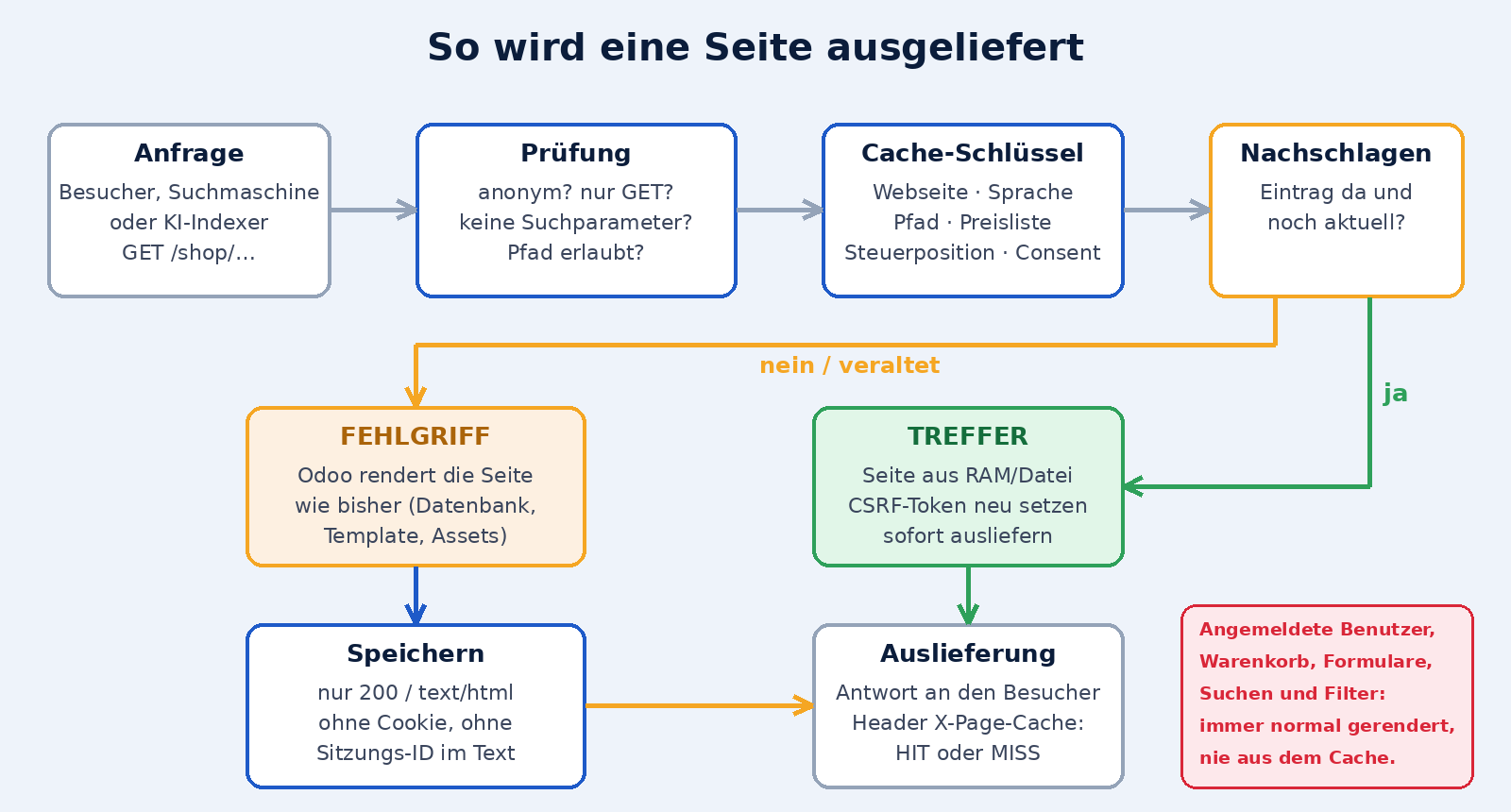
- Check: only an anonymous
GETrequest without search parameters on an allowed path (shop, categories, products, blog) qualifies. Everything else runs through Odoo as usual. - Cache key: it consists of website, host class, language, path, price list, fiscal position and the cookie consent status. Visitors who would see something different therefore never share an entry. The host is normalised in the process: Odoo always writes absolute addresses from the website's domain, not from the request; the request address only decides whether the page counts as the main address (language links) and whether it should be indexed. All foreign host names therefore share a single entry, including the
noindexhint, instead of each occupying a copy of its own. - Hit: if there is a current entry, it is delivered. The CSRF token in the page is reset for every request. Views of blog posts continue to be counted.
- Miss: if the entry is missing or outdated, Odoo renders the page as usual. If the result can be cached (status 200, HTML, no cookie, no session ID in the text), it is stored; the next request is a hit.
- Visible in the header: every response carries the header
X-Page-Cache: HITorMISS. This makes it possible to check with any tool what happened.
How much faster?
In our test system (a copy of our websites, a few hundred pages) the average render time of a page was around 490 milliseconds, and delivery from the cache took around 23 milliseconds: roughly twenty times faster. The more complex a page is, the greater the gain. From both values the dashboard also calculates the estimated server time saved.
File or RAM: choosing the storage location
The cache has two storage locations. Both are visible to all Odoo worker processes in common, so each page exists only once, not once per process.

| Setting | Where are the pages stored? | Properties |
|---|---|---|
| Files | Directory in Odoo's data folder, per database | survives restarts; the operating system keeps frequently used pages in memory anyway |
| Main memory | tmpfs under /dev/shm | fastest delivery; lost when the server restarts and simply rebuilt |
| Automatic | RAM as long as everything fits; otherwise files | A maintenance job (every 10 minutes) decides based on the estimate; it stays on RAM for “fits” and “tight” so that the choice does not keep flipping |
For most installations, Automatic is the right choice: you get RAM speed when the space is there, and otherwise fall back to files without any intervention.
Does the website fit into main memory? And how much RAM is missing?
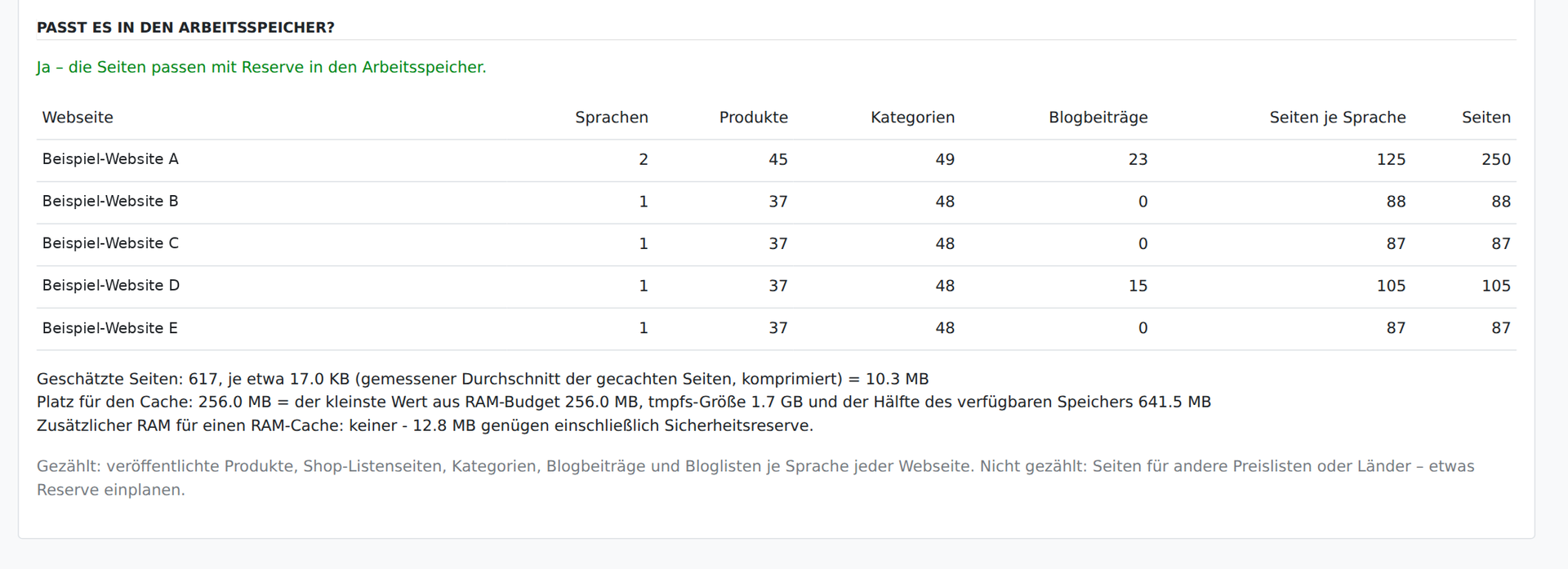
Whether a RAM cache is possible depends on three things: the number of pages, their average size and the available memory. The dashboard works this out for you:
- Number of pages: for each website it counts published products, shop list pages, categories, blog posts and blog lists, and multiplies by the number of languages.
- Page size: as soon as pages are in the cache, the actual average is measured; until then an assumed value applies.
- Room for the cache: the smallest of the configured RAM budget, the size of the tmpfs and half of the available main memory. The server must never run short of memory because of the cache.
- Verdict: “fits with headroom”, “tight”, “too large” or “RAM cache not available”. “Fits” applies when the requirement is at most 80 per cent of the available space.
New: how much additional RAM would be needed?
If the cache does not fit, you want to know what has to change. Below the verdict, the dashboard therefore shows a concrete line: “Additional RAM for a RAM cache: about … more main memory on this server” – or “none” if the space is already sufficient. If it is only a setting rather than the server that is too small, it states below which one: the module's RAM budget or the size of the tmpfs (/dev/shm).
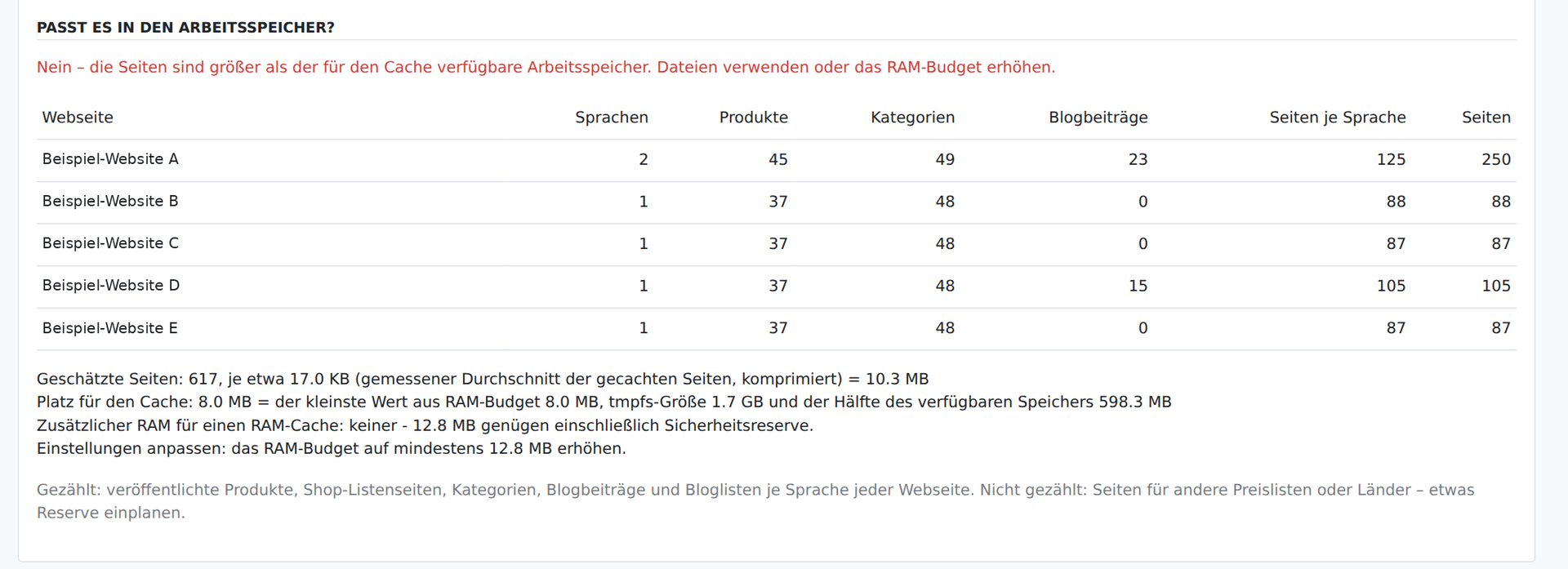
The calculation behind it is simple and easy to follow:

- Requirement = pages × average page size.
- With headroom = requirement divided by 0.8. This value must fit into the RAM budget and into the tmpfs for the verdict to be “fits”.
- Free memory: because the cache may use at most half of the available main memory, the server needs at least twice the value from step 2 as freely available memory. If something is missing, the difference is the additional RAM required.
The example in the picture (12,000 pages of 25 KB each) is a calculation aid, not a measurement of our pages. For small websites a few dozen megabytes are enough; the sample data in the screenshots got by with around 13 MB.
Important for putting it in context: the estimate does not count additional price list or country versions. If you use many of them, allow for some headroom. And: a RAM budget that is too small is the most common reason why the automatic mode stays on files – not a lack of main memory. In that case the dashboard shows exactly this line.
Changes and translations clean up the cache
A cache is only usable if it never delivers outdated pages. A pure time limit (“discard every twelve hours”) would be too coarse: a changed price or a corrected typo would have to wait up to twelve hours. The module therefore works based on content.
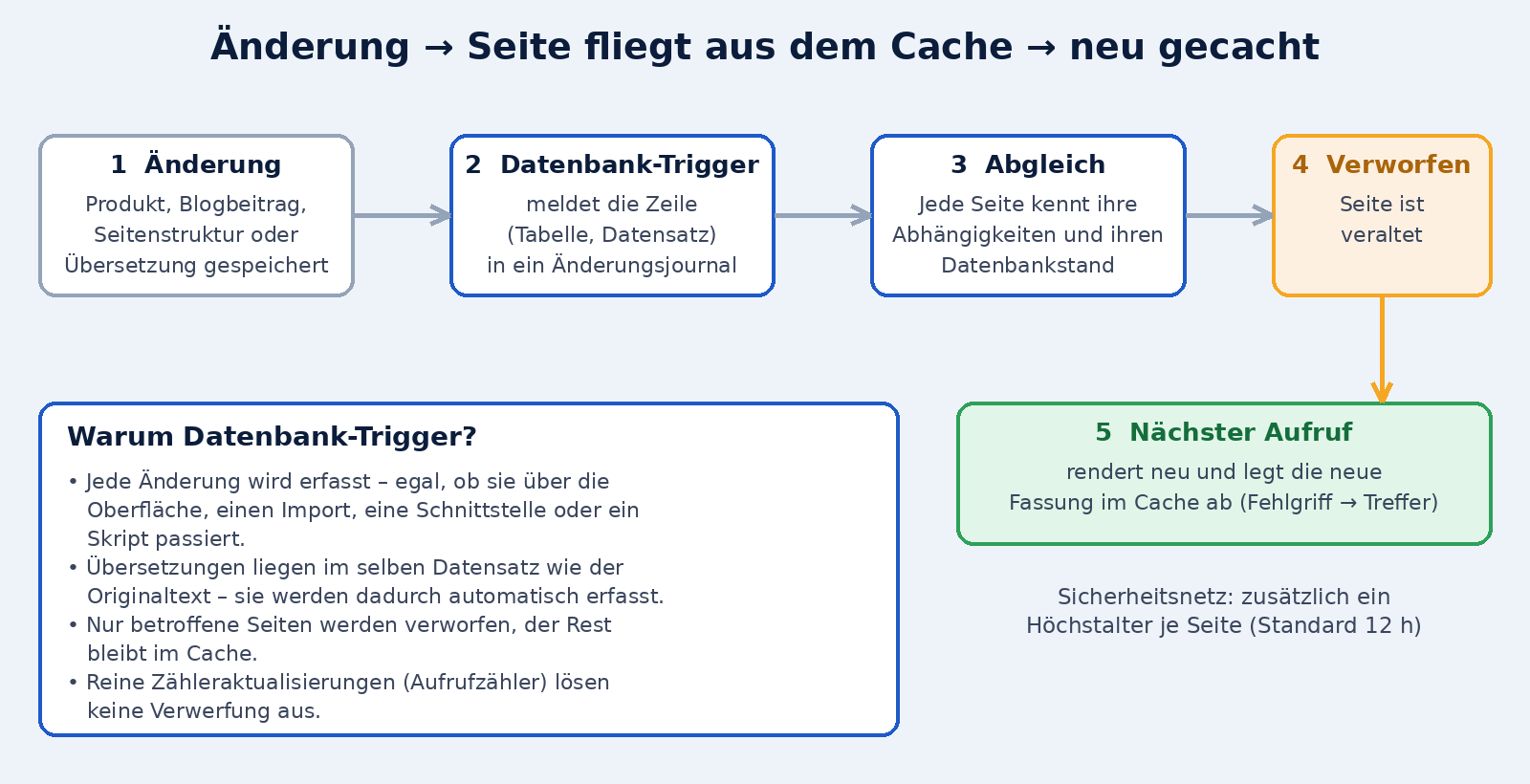
- Database triggers: PostgreSQL triggers sit on all tables that can influence a page (products, variants, images, stock, attributes, categories, prices, taxes, price lists, blog posts and tags, partner and company data, views, assets, menus, languages, website settings). They record every change in a change journal.
- Dependencies and database state: every cached page remembers which records it shows and the database state with which it was generated.
- Comparison: if there is a journal entry that arose after this state and affects one of these records, the page is outdated.
- Caching again: on the next request the outdated page is discarded, rendered afresh and stored again.
Translations are covered too
Odoo 19 stores translated texts in the same record as the original text (as a JSON field). A changed translation is therefore, as far as the database is concerned, an entirely ordinary row change – and the trigger sees it. This applies equally to editing via the interface, to imports, to interfaces and to scripts that write directly into the database. An automatic translation into 46 languages therefore invalidates exactly the pages whose text has changed, and no more.
- Targeted rather than blanket: a changed product invalidates its pages, the lists it appears in and the associated category. The rest stays in the cache.
- Global changes (templates, assets, languages, menus, taxes, currencies) invalidate everything at once, because they can affect every page.
- Counters stay out of it: the view counter of blog posts changes with every visit; it deliberately triggers no invalidation, otherwise the cache would be ineffective for popular posts.
- Safety net: there is also a maximum age per page (default 12 hours).
- No write error caused by the cache: an error inside a trigger is logged as a warning and does not make the actual save fail.
Dashboard and statistics
Everything you need for operation is in one place: in Odoo under Website → Reporting → Page cache. The Overview section is the dashboard (with the settings), the History section shows the figures per day and website.
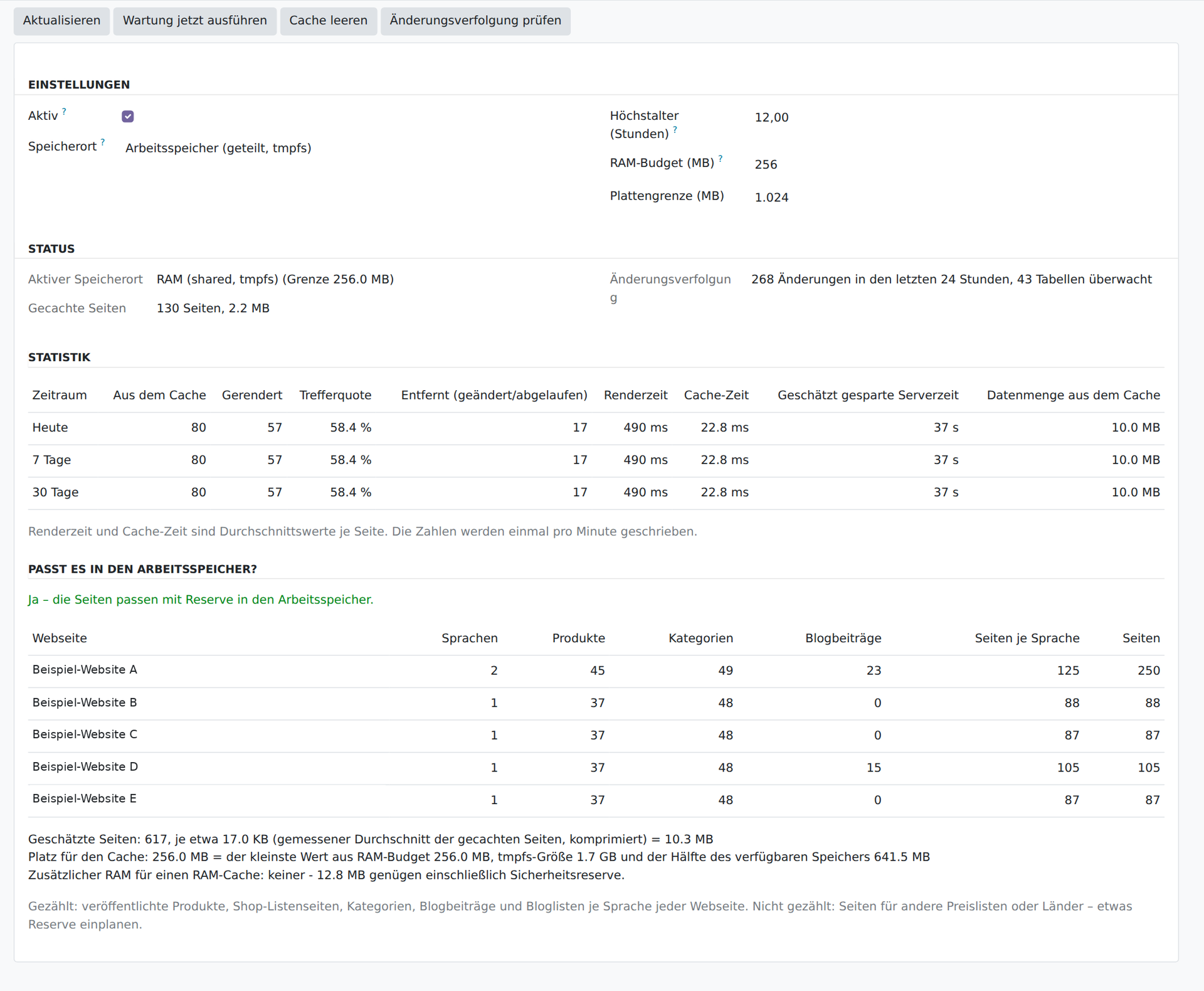
Screenshot from a test system with copies of our websites; the website names have been replaced by placeholders.
Settings
| Setting | Meaning |
|---|---|
| Active | Main switch. When switched off, Odoo delivers every page as before, in all processes after 30 seconds at the latest. |
| Storage location | Automatic, files or main memory |
| Maximum age (hours) | Safety net; pages are renewed after this time regardless of changes |
| RAM budget (MB) | At most this much main memory may be occupied by the RAM cache; at the same time the limit for the “fits” verdict |
| Disk limit (MB) | Maximum size of the file cache; the oldest entries are removed first |
Status and statistics
The status shows the active storage location along with its limit, the number and size of cached pages and the change tracking: how many changes were registered in the last 24 hours and how many tables are monitored. If a monitor is missing, the dashboard warns clearly, because then the cache must not be trusted. The buttons at the top allow you to run maintenance immediately, empty the cache, or check the triggers and recreate them if necessary.
The statistics (today, 7 days, 30 days) contain:
- From the cache and Rendered: hits and misses, and from them the hit rate
- Removed (changed/expired): how many pages were discarded because of a change or expiry
- Render time and cache time: the average per page in comparison
- Estimated server time saved and data volume from the cache
Each worker process collects the figures for itself and writes them once a minute; rows older than 90 days are cleared away by the maintenance job.
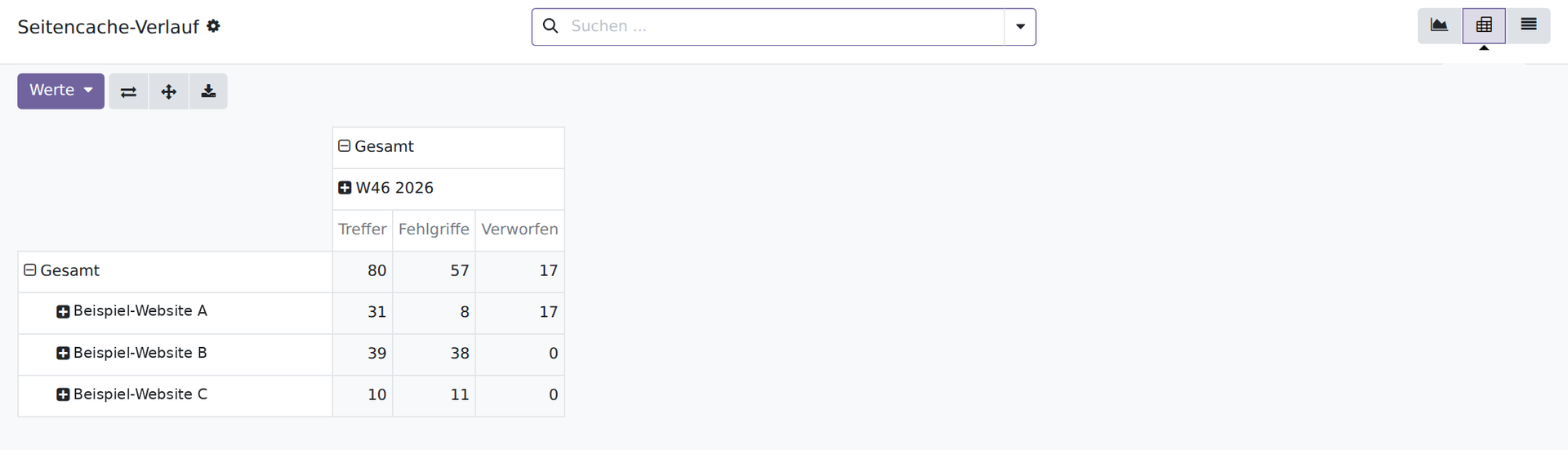
History as a chart, pivot and list
Under History the daily values per website are available – as a chart, as a pivot table or as a list. This lets you see whether the hit rate rises again after a restart or after a large change, and which website receives the most traffic from the cache.
Security: what never comes from the cache
A page cache must never lead to someone seeing another person's content. The module therefore follows the principle: when in doubt, do not cache.
- Anonymous visitors only: anyone who is logged in, has a shopping cart or brings any other session state always gets the normally rendered page.
- Only
GETwithout search parameters: searches, filters, sorting, forms, shopping cart and checkout remain untouched. - Only status 200 and HTML: error pages, redirects and files are not stored.
- No session IDs in the cache: a page that contains a session ID or sets a cookie is not stored (and is logged as a warning).
- CSRF token per request: the token in the cached page is a placeholder and is inserted afresh on every delivery.
- Fine-grained key: website, language, price list, fiscal position and cookie consent are part of the cache key; anyone who sees something different gets a different entry.
- Several databases: every database has its own entries, its own journal and its own statistics.
- No data leakage: the cache lives locally on the server (file or RAM). No data is transmitted to third parties.
Search engines and AI indexers: nothing is blocked
Some operators respond to crawler load by blocking. That protects the server but costs visibility. The module takes the opposite route:
- Same content for everyone: search engines, AI indexers and visitors receive the same page. There is no separate “crawler version” and no detection by browser identifier.
- Faster responses help indexing: a page that responds in 20 instead of 500 milliseconds puts less strain on the crawl budget, and crawlers can capture more pages in the same time.
- Up-to-date content: because changes invalidate the pages immediately, crawlers never see an outdated version – important if you maintain content for search and AI answers.
- Structured data is preserved: JSON-LD, meta tags and
hreflangreferences are part of the cached page; sitemaps and files are not touched by the cache.
If you also want to limit load, that is a separate decision you can take deliberately – the module does not force it on you.
Minifying HTML and delivering it compressed
The cache saves not only computing time but also data volume. The module minifies the HTML before storing it and delivers it compressed when the browser or crawler offers this:
- Minifying (parameter
website_page_cache.minify): HTML comments are dropped and whitespace is consolidated. It is removed entirely only where the browser ignores it anyway, for example between block elements. Spaces between inline elements remain,pre,textareaand scripts stay unchanged, and structured data (JSON-LD) is rewritten compactly. Depending on the page, the pages are 10 to 30 % smaller. In the test with seven real pages, the text, the number of elements, the position of all elements and the screenshot were identical to the original. The first delivery (MISS) is minified just like every later one (HIT). - Compressing (parameter
website_page_cache.compress): pages from the cache go out via gzip (Content-Encoding: gzip,Vary: Accept-Encoding). The large asset bundles (CSS and JavaScript, up to several MB) are delivered uncompressed by Odoo itself; the module compresses them once, stores the copy on the disk and then delivers it directly. In this way 2.1 MB of CSS became 0.27 MB and 4.8 MB of JavaScript 1.1 MB. Old copies are cleared away by the maintenance job. - After a machine restart: the RAM cache survives restarts of Odoo, but not a restart of the server. The maintenance job therefore mirrors it gradually onto the disk (parameter
website_page_cache.persist) and restores it at start-up. Whether a restored entry is still valid is checked by the same mechanism as usual: age and change journal. The minification is not recalculated in the process.
Installation and settings
- Get the module: download the source code from GitHub and place it in an addons path of your Odoo 19 installation: github.com/Alex0176/odoo-website-page-cache
- Install:
odoo-bin -d <Datenbank> -i website_page_cache --stop-after-init. This creates the change journal, the triggers and the maintenance job (every 10 minutes). - Restart the service so that all worker processes load the module.
- Open the dashboard: Website → Reporting → Page cache. Check that change tracking is complete and choose the storage location (default: automatic).
- Verify: request a shop or blog page twice and look at the header
X-Page-Cache: the first timeMISS, afterwardsHIT.
The settings exist as system parameters (website_page_cache.enabled, .backend, .ttl_hours, .max_mb_file, .max_mb_ram) and are normally managed in the dashboard. The module is translated into German. Uninstalling removes the triggers, the journal and all cached pages completely again.
Tip for the RAM cache: the RAM budget in the dashboard and the size of the tmpfs (/dev/shm, mount option size=) must match the requirement. The “Does it fit into main memory?” check gives you both with concrete values.
Limits you should know about
- Short delay after changes: the index of the change journal is refreshed every two seconds. Until then, a changed page may still be delivered in its old version.
- Stock-dependent texts are updated via stock changes and the maximum age.
- Estimate of the space required: additional versions per price list or country are not included; allow for some headroom.
- Not a replacement for everything: the cache relieves requests that it may serve. Logged-in users, searches and forms still run through Odoo.
- The first request stays slow: after a restart of the server (RAM) or a global change, every page is rendered normally once before it is in the cache.
Frequently asked questions
What is the page cache for Odoo?
An open-source module (website_page_cache, Odoo 19, LGPL-3) that delivers public shop and blog pages to anonymous visitors from a cache instead of rendering them afresh on every request. The cache lives, as you choose, in files or in main memory.
Does the module block search engines or AI crawlers?
No. Search engines and AI indexers receive the same pages as any other visitor, just faster. There is no blocking, no throttling and no separate crawler version.
Are changed pages and translations cached again automatically?
Yes. PostgreSQL triggers report every change to relevant tables to a journal; affected pages are discarded and, on the next request, rendered afresh and stored. Translations are covered because Odoo 19 stores them in the same record.
Should I choose file or RAM?
As a rule Automatic: the module uses RAM as long as all pages fit and otherwise falls back to files. Files are suitable if the cache is to survive restarts or if RAM is tight; RAM is the fastest option.
How do I find out whether my website fits into main memory?
In the dashboard under Website → Reporting → Page cache. The “Does it fit into main memory?” section counts the pages per website and language, measures the page size and compares the requirement with the RAM budget, the tmpfs size and the available memory.
How much additional RAM is needed for a RAM cache?
The dashboard shows it as a separate line. The calculation: requirement = pages × page size; with a safety margin, divided by 0.8. Because the cache may use at most half of the available memory, twice that figure is the memory that must be free; the difference is the additional RAM. If only the RAM budget or the tmpfs is too small, the dashboard names the setting together with the target value.
Can the cache show someone else's content?
No. Only anonymous GET requests without search parameters are cached. Logged-in users, shopping carts, forms and searches never come from the cache; language, price list, fiscal position and cookie consent are part of the key.
How do I switch the cache off in an emergency?
In the dashboard, switch off the “Active” switch or set the system parameter website_page_cache.enabled to 0. This applies in all worker processes after 30 seconds at the latest. Uninstalling also removes the triggers, the journal and cached pages.
How can I tell whether a page came from the cache?
From the response header X-Page-Cache: HIT means from the cache, MISS means freshly rendered and stored.
Does the module make the HTML smaller and compress it?
Yes. Cached pages are minified conservatively (comments and superfluous whitespace are dropped, content and appearance remain the same) and delivered via gzip on cache hits; the asset bundles are compressed once and delivered from the disk. Both can be switched off via the parameters website_page_cache.minify and website_page_cache.compress.
Support from Biricon IT Services
Is your Odoo website sluggish under crawler load, or do you want to make your shop and blog faster and more visible? We support you with the analysis of the load, with the set-up of the page cache, with the sizing of main memory and worker processes and with the multilingual search engine optimisation of your Odoo website. You can find the module's source code on GitHub.
As of: 10 November 2026. Measured values come from a test system with sample data and are not a guarantee for other installations.