
Source code: github.com/Alex0176/odoo-web-rbl — AGPL-3, free to use.
Anyone running an Odoo server on the internet gets visitors. Not occasionally, but constantly. Over seventeen days, we logged and analysed 731,297 requests across our five websites. 110,511 of them were not visitors, but automated searches for vulnerabilities, credentials and configuration files.
This article describes Web RBL, an open-source module for Odoo 19 Community that detects, scores, records and rejects this traffic — and publishes its blocklist as an RBL list, in a format that firewalls and reverse proxies can read directly. All figures come from live operation.
What the module can do — features at a glance
| Feature | What it does | Default setting |
|---|---|---|
| Pattern detection | Detects probes by path and file extension: .env, .git, configuration files, cloud keys, CI/CD build instructions, WordPress, PHP, path traversal, database managers, GraphQL, command execution via /api/fs/exec and similar interfaces | block |
| Three levels per pattern | block, count or report — configurable for each pattern without code | per pattern |
| Thresholds | The number of matches for the same pattern before blocking takes effect; ten for logins | 10 for logins |
| Login protection | Failed logins via the login form and XML-RPC/JSON-RPC, failed session checks and attempts to access the database manager — stored in the database, rather than in memory | on |
| Bot detection at login | Anyone who ignores the wait message after ten failed attempts and keeps trying is blocked immediately | block |
| Behavioural detection | Addresses that generate twenty error pages and hardly any successful page requests within five minutes — guessing rather than reading | report |
| Score from 0–100 | How certain is it that an attacker is behind the address? Based on pattern severity, the number of distinct patterns, days with suspicious activity, affected domains and match count — with a plain-language explanation | on |
| Score-based login blocking | Logins are blocked at or above a configurable score, while the website remains accessible for reading. | 40 and above |
| Suspected stolen credentials | A successful login from a suspicious address is reported and can optionally be assigned as a task — once per address per day | on |
| Threat lists | Tor exit nodes, Spamhaus DROP, FireHOL Level 1 and blocklist.de preconfigured; any other RBL list can be added by URL, with daily updates and a separate level for each list | report |
| No login access | The fourth level for lists and countries: the website remains readable, while the login form and interfaces are blocked — the right response to Tor | Optional |
| Country of origin | Country for each match and address via GeoLite2; the module keeps the database up to date automatically using a free licence key | display |
| Country rules | Block, deny login access, report or explicitly allow — per country, deliberately with no default | none |
| Misconfigurations | QNAP, Synology, Exchange Autodiscover, ActiveSync and WebDAV/CalDAV/CardDAV are detected, never blocked, and added to a worklist with the findings and affected domain | report |
| One ticket per address | A finding can optionally become a ticket — exactly one per address, with closed tickets reopened rather than duplicated | off |
| Mandatory legal pages and scrapers | The canonical path to the legal notice always remains accessible; automated attempts to try alternative spellings are detected and can optionally be blocked | report |
| Allowlist | Addresses and networks that are never blocked; populated daily from the firewall (VPN peers) and the published address ranges of Googlebot and Bingbot | on |
| Customer association | A match from a customer's network is associated with that customer — using the allowlist, never manual guesswork | on |
| Domain and user agent per match | Which website was requested, and with which User-Agent — both are missing from the access log | on |
| Analysis | Chart and pivot views across all matches: by pattern, day, domain, country and address | on |
| Decoys | Probes receive fabricated responses containing a canary value; anyone who subsequently requests it has read them | off |
| RBL publishing | The blocklist as a plain address list or JSON at a dedicated, token-protected URL — for HAProxy, OPNsense and any firewall that reads lists from URLs | on |
Anything supplied with a default of report, off or Optional is deliberately configured that way: anyone enabling blocking should do so because they have spent a few days observing who it catches — rather than because the default dictated it.
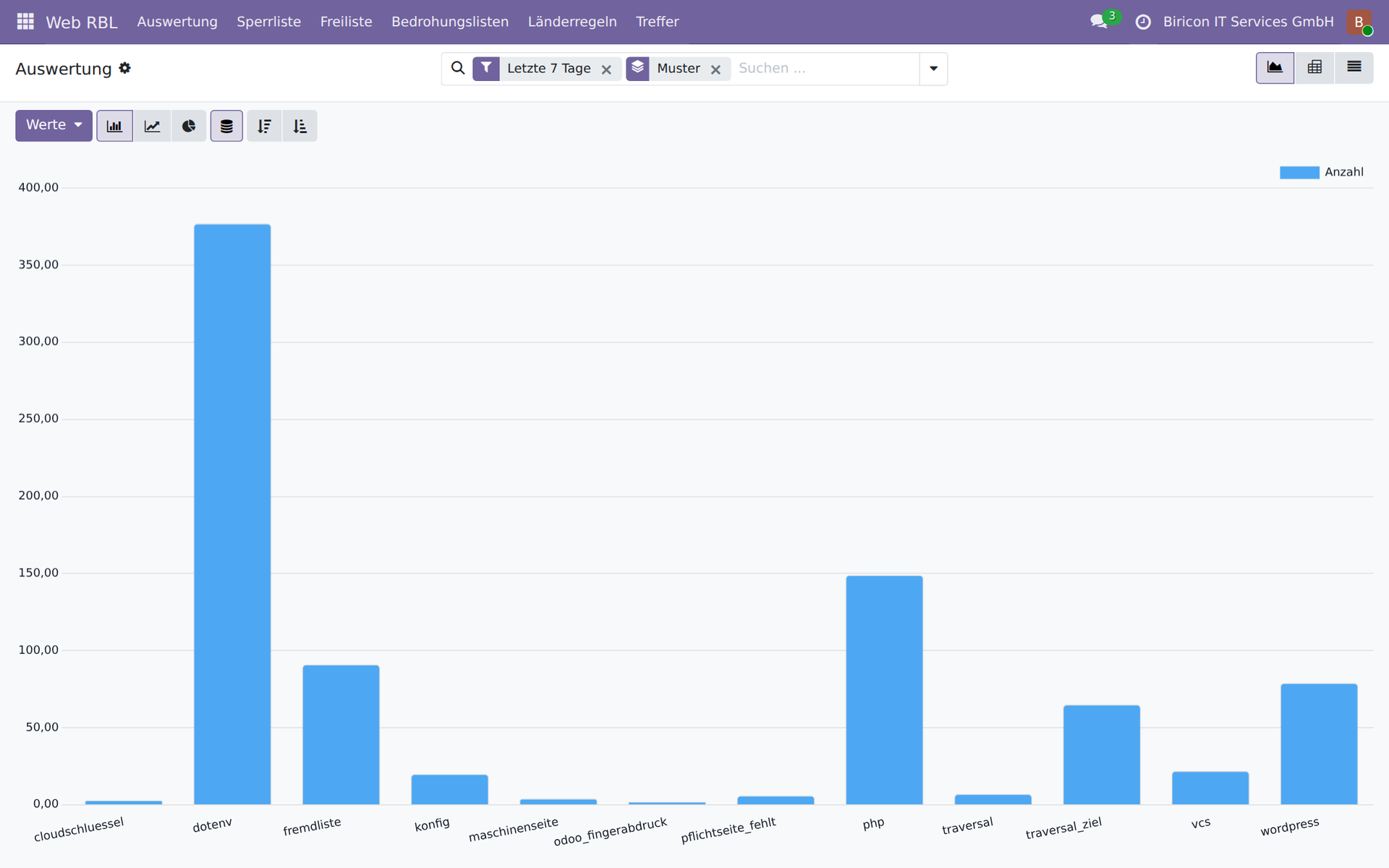
The analysis: matches per pattern over seven days. The tallest bar represents searches for .env files.
RBL lists: a standardised way to distribute blocklists
RBL stands for Real-time Blackhole List. The term comes from the world of email, where Spamhaus and others have been publishing lists of malicious sender addresses since the nineties. The principle is extremely simple, which is precisely why it is so widespread: one address per line, available over HTTP, reloaded regularly. No format that needs parsing first, no interface that requires a tool.
Virtually every firewall and reverse proxy can read such a list and build rules from it. Vendors use different names, but the mechanism is the same everywhere:
- OPNsense and pfSense — URL Table Alias: load an address list over HTTP, use it as an alias in firewall rules, and update it hourly or daily
- HAProxy — ACL files and maps:
src -f sperrliste.txtin anhttp-request denyrule, reloadable via the runtime API without restarting - nginx — geo module with an included address file, or
denydirectives from a generatedincludefile - Fortinet FortiGate — External Block List or Threat Feed: a URL from which the firewall retrieves an IP list for use in policies
- Palo Alto Networks — External Dynamic List (EDL): the same principle, implemented as a dedicated object type in security policies
- Check Point — Custom Intelligence Feeds and IP Block Lists via a URL
- Cisco Secure Firewall (Firepower) — Security Intelligence Feeds using custom list sources
- Sophos Firewall — Third-Party Threat Feeds: address lists from a URL as a source for blocking rules
- Juniper SRX — Dynamic Address Entries from feeds
- MikroTik RouterOS — Address Lists, populated from a URL using a script and
fetch - CrowdSec — custom lists as a source for bouncers on any supported system
Web RBL publishes its blocklist in exactly this format. The firewall drops the packets before they reach the web server — along with any other attempts from the same address, such as those targeting the mail server or VPN gateway.
Both directions, but in the right place
It also works the other way round: any RBL list can be added to Web RBL — a URL, a level, and you are done. Tor exit nodes, Spamhaus DROP, FireHOL and blocklist.de are preconfigured; others can be added in three clicks. The module breaks each list down into address ranges and checks every request against them in just a few microseconds.
Even so, it makes more sense to use third-party lists on the firewall in front of the server. There are three reasons. The firewall sees all services, not just HTTP — an address on the Spamhaus list should also be blocked from the mail server and VPN. It drops packets before a connection is even established, putting no load on the application server. And it is where these lists are maintained anyway; a second copy in the application is another place where they can become outdated.
What lists within the module are still useful for is doing what a firewall cannot. It has no concept of a login form. Web RBL can deny an address on the Tor list access to the login while still serving the website — anyone who wants to read anonymously should be allowed to; anyone who wants to try passwords anonymously should not. It can also flag a successful login from a listed address as suspicious. Both require the list to be available where the login takes place.
Scoring rather than guesswork
An address that has requested /wp-login.php once is different from one that has triggered five distinct patterns across three domains on two days. Web RBL converts this into a score from 0 to 100 — based on what it has observed itself, without a third-party service or any external queries.
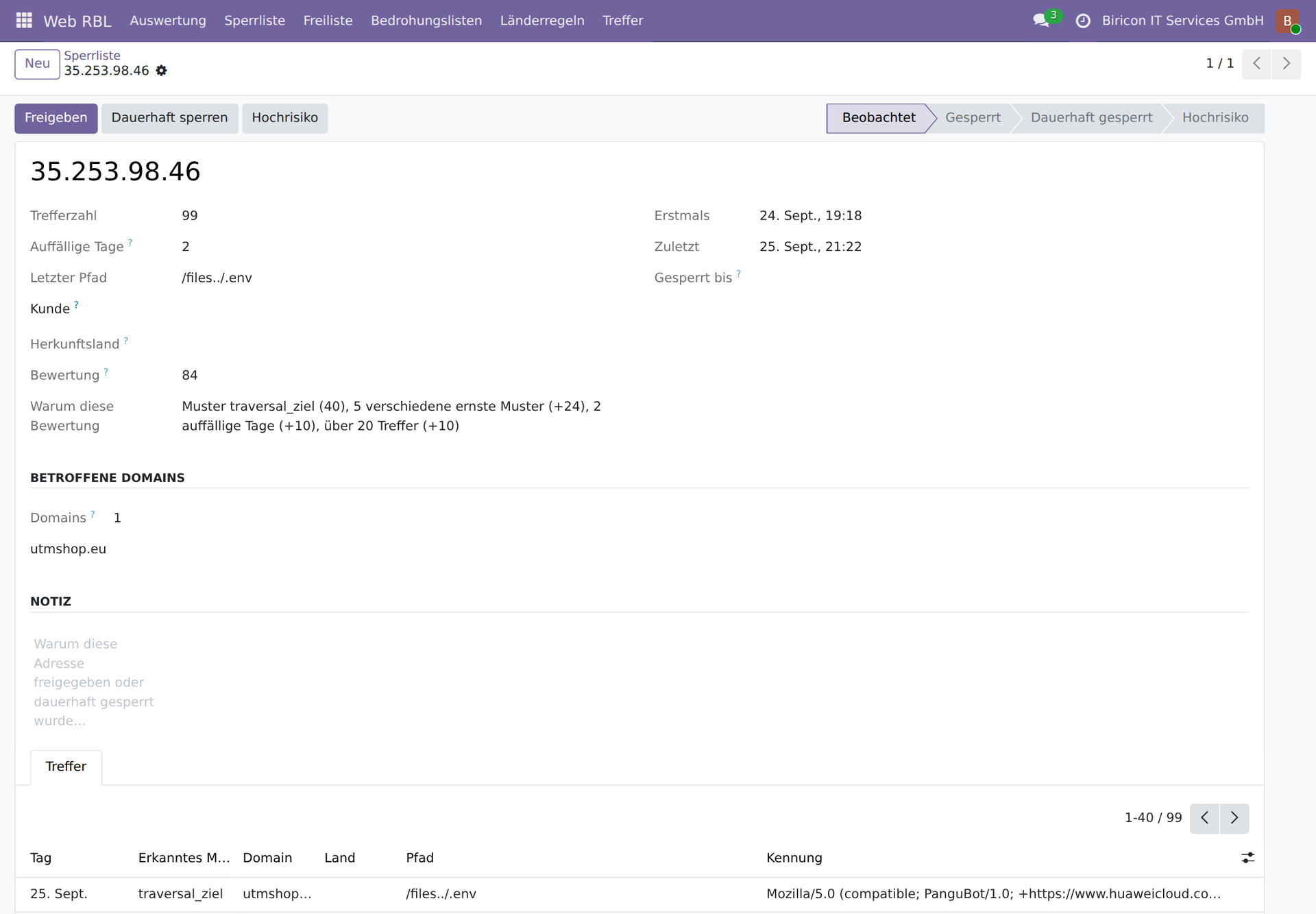
An entry: 99 matches, a score of 84, and the explanation in plain language — the most severe pattern, five distinct serious patterns, two days with suspicious activity and over twenty matches.
The score determines two things. At or above a configurable value, logins are blocked — the website remains accessible for reading, but anyone who has already searched for credentials gets no opportunity to try any they have found. And a successful login from an address with a score is reported: at that point, someone was no longer guessing; they knew. Either the authorised user was away from their usual location, or the credentials have been compromised — the module does not decide which; it flags the case to someone who can ask. The password itself is never touched in the process.
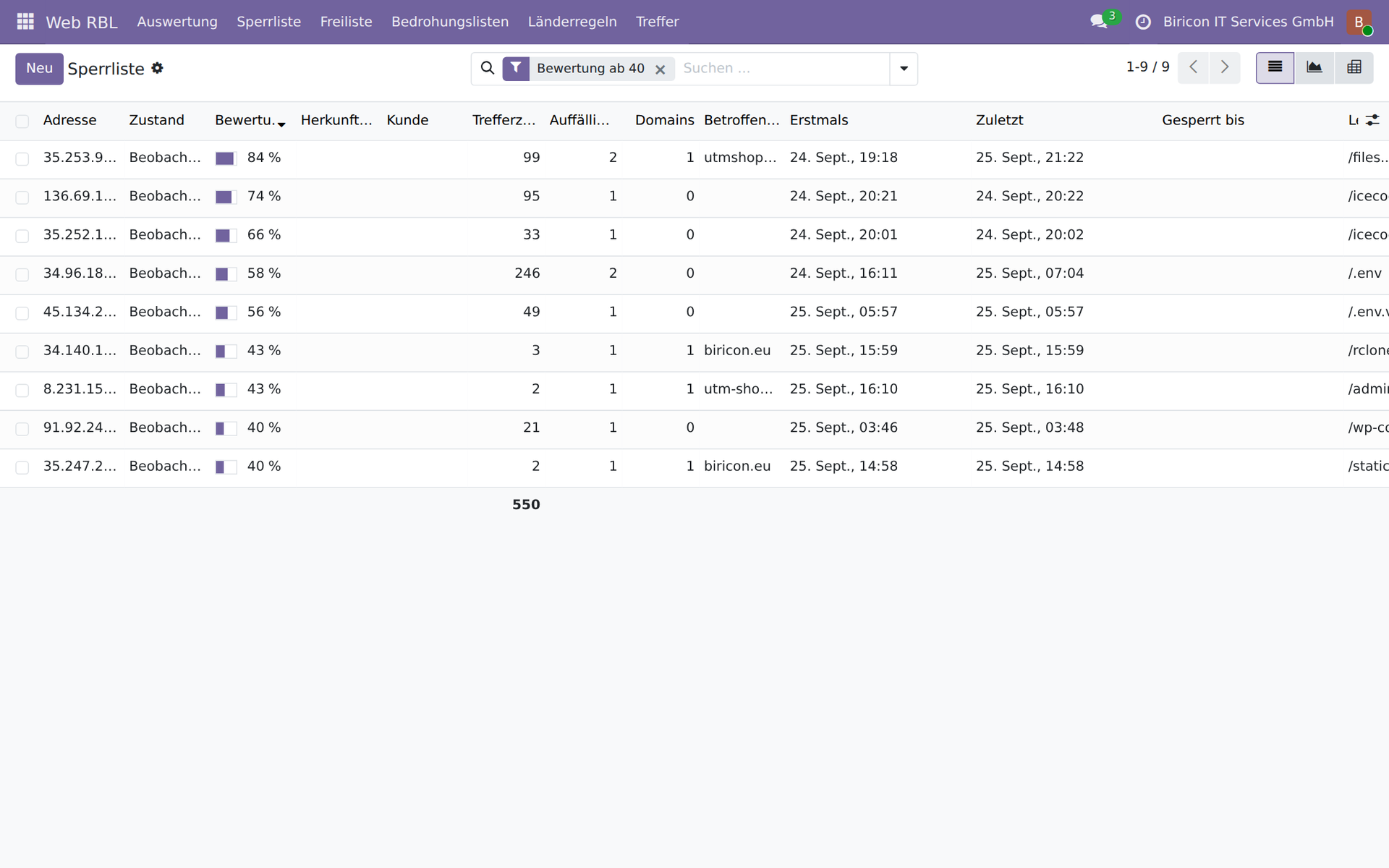
The blocklist, filtered to scores of 40 and above: match count, days with suspicious activity, affected domains and the last path for each address.
What Web RBL protects — protection in detail
1. Credentials remain undiscovered
The largest attack category we measured searches for secrets left exposed, rather than vulnerabilities in Odoo. Over seventeen days:
- 57,721 requests for
.envfiles — these contain database passwords, API keys and session secrets - 5,535 requests for configuration files
- 4,388 requests for cloud credentials:
credentials.json,service-account.json,firebase-adminsdk.json,rclone.conf,.git-credentials - 2,811 requests for
.gitdirectories — anyone who finds one downloads the complete source code including history - 1,907 requests for build instructions such as
.github/workflows/deploy.ymlor.gitlab-ci.yml, which contain registries and key names
What matters here is the number of distinct addresses, rather than the number of requests: /credentials.json was requested from 98 addresses, and /.git-credentials from 92. This is a standard repertoire being run simultaneously around the world, rather than a single scanner.
2. Login attempts go nowhere — permanently
Odoo has its own mechanism for slowing down password guessing. It has three limitations, documented in Odoo's own source code: the counter is held in the worker process's memory and resets on every restart, it only delays rather than blocks, and it counts only attempts that reach the password check.
Web RBL hooks into the same points, but writes to the database. This means:
- The count survives every restart and applies across all worker processes
- Both routes are covered: the login form at
/web/loginand the interfaces at/xmlrpc/2/commonand/jsonrpc - Attempts that never reach the password check are also recorded — such as logins without a valid session token
- A failed attempt to access the database manager is also counted; this is the most serious login attempt of all
The login threshold is set to ten, based on what we measured: of nine failed logins in seventeen days, most came from customers setting up access on another device themselves and entering the wrong domain — in one case, their own domain with a hyphen instead of a full stop. Blocking on the first failed attempt would therefore have caught customers setting up access rather than attackers.
Anyone who keeps trying after the server has already replied “please wait a moment”, however, is blocked immediately. A person reads that message and waits; anything that ignores it is a program. A dedicated pattern with a threshold of zero catches precisely this case, and it cannot catch a colleague by mistake: only someone who has already made ten failed attempts and then continues can reach this point.
3. The attack no longer puts a load on the server
Before the module was installed, a probe targeting a path such as /@fs/../../.env was costly: Odoo looks up the error page, renders it, stumbles over the dot segments when constructing the URL, and then fails on the error page for the error page too. Two stack traces per probe. We measured 28,401 such errors over seventeen days, plus 9,467 subsequent errors.
Web RBL hooks into ir.http._match, which means before routing. The response requires no template, no database access beyond the block check, and no log entry. Checks against the allowlist, threat lists and country rules run from the cache using sorted address ranges — just a few microseconds, even with more than thirty thousand ranges.
4. The firewall keeps the attacker out before they arrive
The blocklist is published as an RBL list that HAProxy and OPNsense can read directly. The attacker can then no longer reach the web server — or any other service on the same host. A single access attempt identified as malicious thus provides retrospective protection for the entire machine.
Three levels: block, count, report
Not every request for a nonexistent page is an attack. Web RBL therefore distinguishes between three levels, configurable for each pattern without changing the code.
| Level | The triggering request | Consequence for the address |
|---|---|---|
| block | is rejected | blocked for 24 hours; permanently after three days with suspicious activity |
| count | is allowed through | recorded only, no blocking |
| report | is allowed through | recorded with a description of the findings; never blocked |
For threat lists and countries, there is a fourth level: no login access. The website remains readable, while the login form and interfaces are blocked. This is the middle ground for anything suspicious that is not necessarily malicious — Tor, a data centre address range, or a country with no customers.
Which attacks are detected
All patterns have been tested against real traffic. The number of distinct addresses is deliberately shown alongside — it reveals whether a pattern catches a single scanner or a widespread technique.
| Attack category | Requests | Addresses |
|---|---|---|
.env harvesting | 57.721 | 223 |
| PHP probes | 12.237 | 256 |
| Path traversal targeting valuable files | 10.046 | 64 |
| Configuration files | 5.535 | 114 |
| Cloud access keys | 4.388 | 152 |
| WordPress probes | 3.366 | 385 |
.git harvesting | 2.811 | 255 |
| Odoo reconnaissance (database manager, version query) | 2.500 | 213 |
AI toolchains and command execution (/mcp, /api/fs/exec) | 2.450 | 74 |
| Build instructions (CI/CD) | 1.907 | 88 |
| GraphQL endpoints | 1.878 | 71 |
The newest category is particularly striking. /api/fs/exec received 369 requests from 54 different addresses — these are attempts to execute commands, rather than read data. Such targets did not exist two years ago; they come from the interfaces of new AI tools and task queues. Defences focused solely on WordPress and PHP miss them entirely. This category therefore carries considerable weight in the scoring.
Threat lists and country of origin
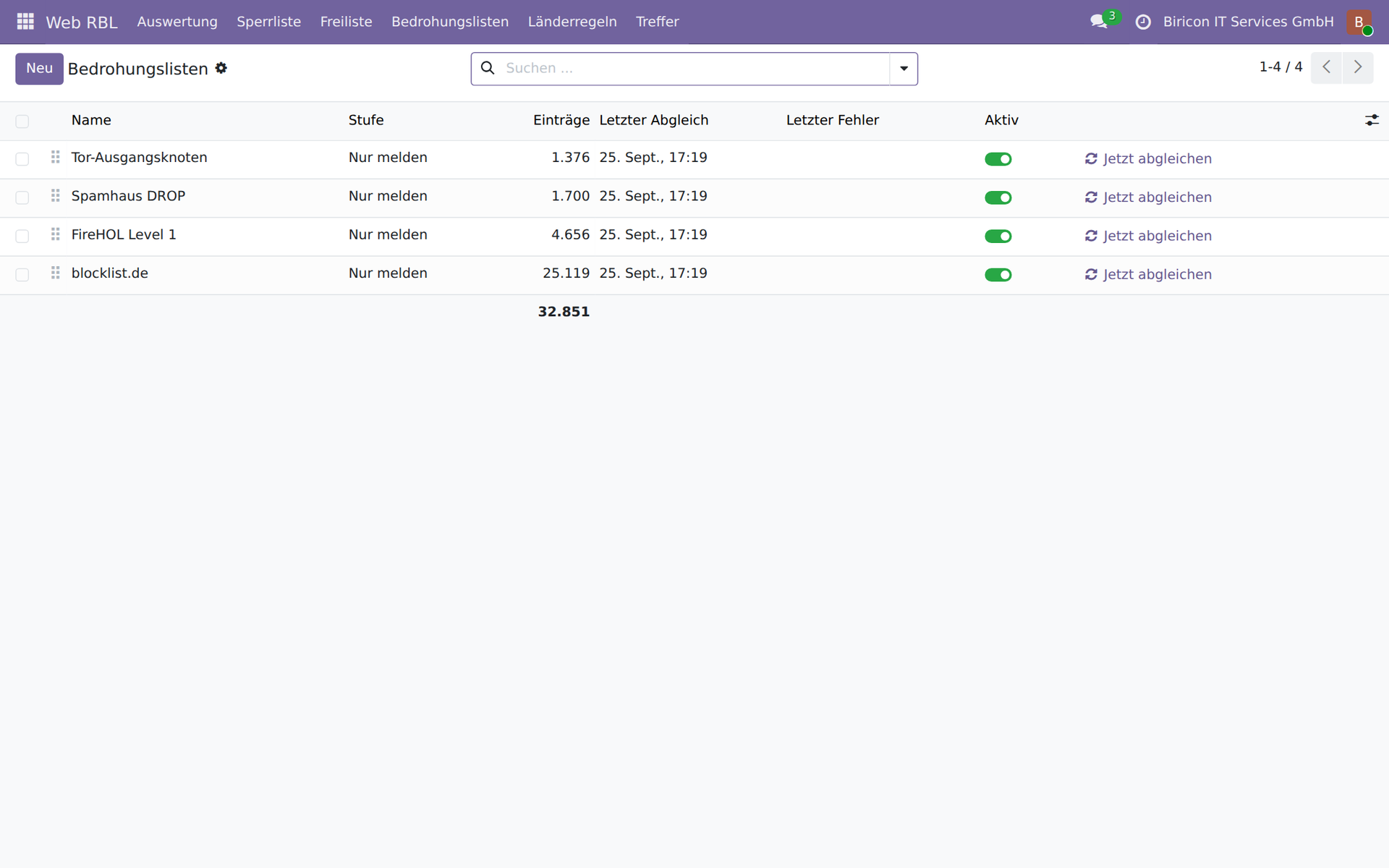
Four lists, 32,851 address ranges, all set to “report only”. Each additional list needs just a URL and an action level.
A third-party list is a claim made by someone else, for reasons we do not know, about traffic we have never seen. It may be wrong, outdated or intended for a different purpose: blocklist.de mainly collects addresses that have been trying SSH logins elsewhere, which tells us little about their behaviour towards a web server. That is why Web RBL keeps third-party lists separate from its own blocklist, and why the default is to report. And our own allowlist always takes precedence: a customer we know carries more weight than a third party’s assessment.
The country of origin is shown for every match and every address. It is invaluable when assessing activity — a login attempt from your own country at ten in the morning is different from one originating in a country where you have no customers. It is of little use for blanket blocking, as our own figures show: the attackers on our list mostly came from cloud address ranges in Belgium, Finland and the Netherlands. Blocking everything outside the German-speaking countries would have missed them — while blocking our own staff on holiday and customers travelling on business.
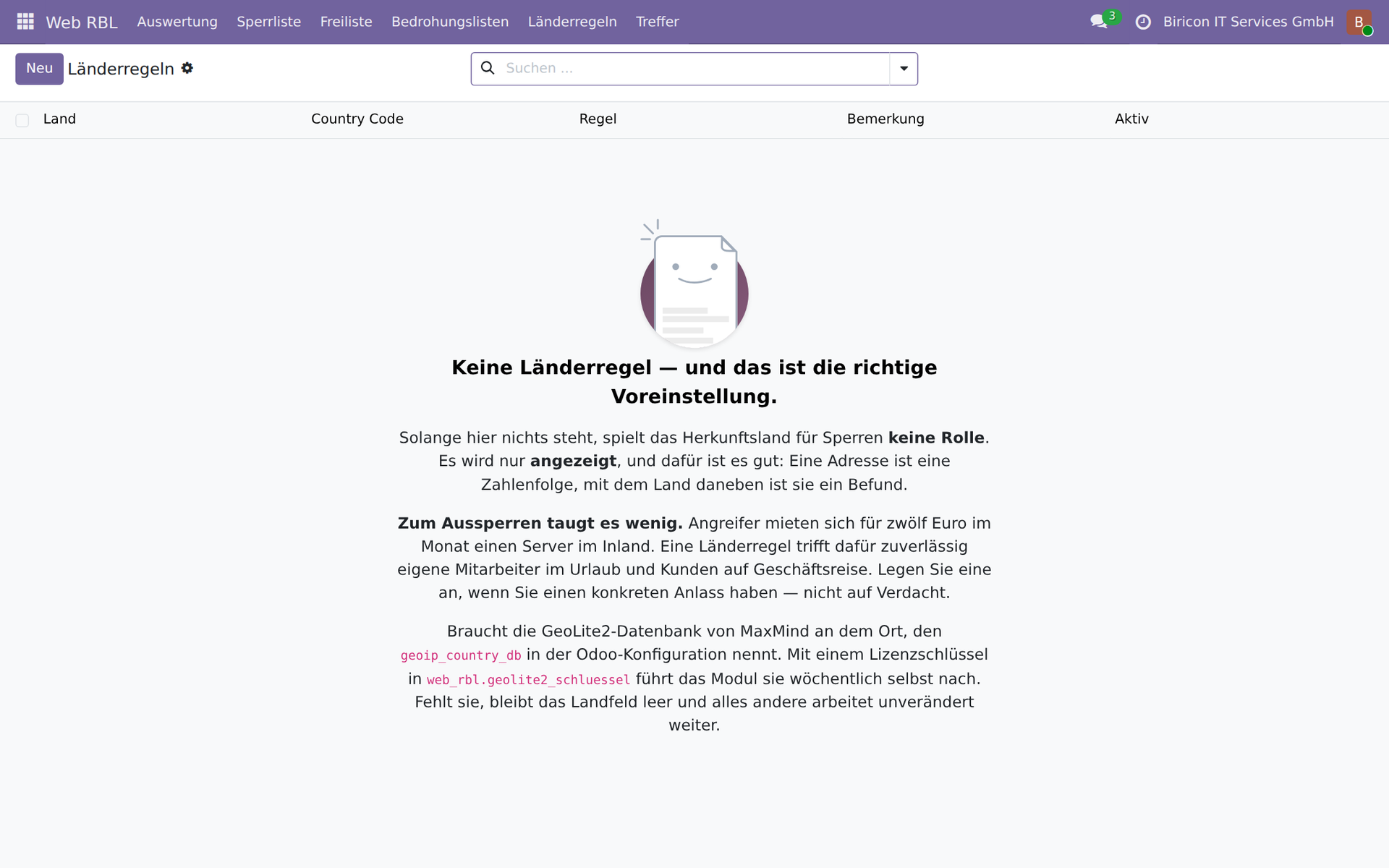
Country rules are empty by default, and the view explains why.
Report misconfigurations rather than blocking them
The most common case in live traffic is neither an attack nor a visitor, but faulty software mistaking the web server for something else:
- 1,367 requests to the web interface of a QNAP NAS — a sync client whose destination is no longer correct. A single internet connection accounted for 962 requests.
- 65 Autodiscover queries — an Outlook client mistaking the web domain for its Exchange server
Such addresses are never blocked. Blocking does not fix the fault; it hides it — and penalises the person whose device is already misconfigured. Instead, an entry is created with a description of the findings and the affected domains. If required, this automatically becomes a ticket: exactly one per address. If it is closed and the address is flagged again, the same ticket reopens instead of a second one being created.
QNAP, Synology, Exchange Autodiscover, ActiveSync and WebDAV, CalDAV and CardDAV clients are recognised. The patterns specify exact filenames and directories, never just extensions: in the same /cgi-bin/ directory, harmless sync requests sit alongside classic probes such as printenv.pl.
The allowlist: addresses that are never blocked
The cost of a mistake differs from one address to another. A false positive for a scanner in a data centre costs nothing. For the remote endpoint of a site-to-site tunnel, it costs the site its connection.
That is why there is a second list, which takes precedence over the first: addresses and networks that are never blocked. It does not silence anything — listed addresses are still checked and logged; only the blocking is omitted. That is the difference from a firewall exception: one makes you blind, the other simply makes you patient.
It is populated daily from two sources: the firewall itself, which supplies all VPN peers so that a newly configured tunnel does not depend on someone remembering the blocklist — and the address ranges published by Google and Microsoft for their crawlers. This is the only way to distinguish a real Googlebot from a scanner using that name. Search engines must never be blocked; shutting them out removes your site from indexing with no way back.
One rule matters more than synchronisation itself: an empty response never deletes anything. If the source fails to respond, returns nothing or sends an unintelligible response, the list remains unchanged. An allowlist that empties itself during an outage takes every tunnel down with it at the worst possible moment.
If an allowlist entry has a customer assigned to it, every match from that customer’s network is attributed to them. A misconfiguration immediately has a point of contact, without anyone having to look up addresses.
Mandatory disclosures and automated data collectors
The legal notice is no ordinary page. It must remain accessible to people, because blocking it creates precisely the breach a data harvester is looking for. At the same time, it is the page containing names and addresses — making it a target for automated harvesting.
During the wave of legal demands in Austria over embedded Google Fonts, the logs showed that the letters were not prompted by individual visits, but by an automated sweep: unrelated hosts accessed milliseconds apart.
Web RBL handles this by lowering the action level rather than making an exception. The canonical path /impressum matches no pattern and always remains accessible. Alternative forms such as /impressum.php — which cannot exist on an Odoo site — are reported, and anyone unwilling to accept automated harvesting can change a parameter. sitemap and robots are exempt and can never be blocked: they contain no personal information, and fetching them is part of every search engine crawler’s job.
Domain and user agent: what the access log leaves out
The werkzeug access log records neither the requested host nor the caller’s user agent. Odoo naturally receives both — without the host, it could not select the correct website when hosting several. But you cannot look them up afterwards.
Web RBL records both for every match. This answers two questions that would otherwise remain unanswered: which website a misconfigured client is trying to reach — and therefore which customer owns the domain — and whether an address is visiting one site or all of them. Requests to several unrelated domains from the same address are the hallmark of an indiscriminate sweep, and increase the score.
An analysis of one of our websites showed how much the user agent matters: over seventy per cent of all traffic came from a single caller, spread across more than a hundred addresses. Without the user agent, it would have looked like a distributed scraper. It was GPTBot, OpenAI’s crawler — repeatedly requesting robots.txt and behaving entirely correctly.
Security considerations in detail
1. Proxy detection — the most dangerous point of all
If Odoo runs behind a reverse proxy and proxy_mode is set incorrectly, the module sees the same address for every request: the proxy’s. Blocking it would then lock out all visitors at once.
Before blocking anything, Web RBL therefore checks that the address can be determined reliably. It requires proxy_mode together with a forwarding header, refuses to proceed if a forwarded request arrives without proxy_mode, and likewise refuses if there is more than one intermediate proxy. When in doubt, it does not block.
2. Never block your own networks
Private address ranges, loopback, link-local and CGNAT are permanently excluded. They cannot end up on the list under any circumstances, not even by hand. The same applies to third-party lists: private and reserved ranges as well as absurdly large networks are discarded on import.
3. An internal error must not take the website down
The entire check runs within a safeguard that catches every error. Anything that goes wrong here is logged, and the request continues unchanged. A protection module that takes the website down when it encounters an internal error is worse than having none at all. All queries during request processing also run without the visitor’s browser language and without sorting by translated fields — a visitor using a language that is not installed must not cause the check to fail.
4. Observe before blocking
After installation, blocking listed addresses for ordinary requests is disabled. Probes are rejected and logged; everything else passes through. This allows a few days of observation to see who actually ends up on the list before anyone is blocked. The same applies to behavioural detection, threat lists and country rules: report first, review, then block.
5. Precise patterns rather than casting a wide net
Misidentifying a visitor costs more than missing a probe. Each pattern therefore has its own action level, which can be changed individually. A file extension alone is rarely enough: for .php, there are 14,012 genuine probes against a handful of old links; for .asp, the ratio is reversed. Decisions like these need measurement, not guesswork.
6. Manual unblocking remains in effect
Anyone who unblocks an address has a reason. Another match does not silently override that decision.
7. The list is protected, but it is no secret
The endpoint requires a token and returns 404, rather than 403, without a valid one — so it does not even confirm that the URL exists. The comparison runs in constant time. The list itself contains nothing confidential: it consists of addresses that contacted us of their own accord.
8. No secrets in the records
For failed logins, the attempted username is recorded, never the password. For the database manager, nothing at all is read from the submitted values: the master password is first among them, and a blocklist entry ends up in every database backup. The GeoLite2 licence key is stored only in the system parameter and never appears in a log entry.
9. The decoy reveals nothing useful
Web RBL can optionally respond to probes with fabricated content containing a unique canary value. Anyone who subsequently requests that value has read the fake response and acted on it — ruling out a false positive. The decoys contain no useful information, real paths or valid credentials. This feature is disabled by default, because it visibly changes the system’s external behaviour.
What the module cannot do
It replaces neither a firewall nor a web application firewall. It detects known probing patterns in paths, failed logins and conspicuous behaviour — not attacks on forms, not injection attempts in parameters.
It also sees only what comes back over HTTP. What an attacker does with stolen database or mailbox credentials remains invisible — which is precisely why the canary values are paths rather than credentials.
Nor does it replace due care: a module that rejects .env probes does not make an accidentally exposed .env file harmless.
Availability
Web RBL is publicly available under AGPL-3 and runs in production on five of our websites:
github.com/Alex0176/odoo-web-rbl
The module requires Odoo 19 Community and has no dependencies other than base and web. Ticket integration is optional and does not require any particular ticketing system; without one, nothing happens. Country-of-origin information requires MaxMind’s free GeoLite2 database; if it is missing, the field stays empty and everything else continues to work as usual.
Further reading: How Web RBL fits into a complete security architecture -- alongside a firewall, two-factor authentication and permissions, including step-by-step instructions: Combining the elements of Odoo 19 security architecture effectively.
We welcome questions, comments and bug reports — preferably as an issue on GitHub.