
For many years, we have operated our own GPS tracking platform for our customers: vehicles and devices report their positions to our tracking server, while customers view their fleet live on a map, keep mileage logs, define geofences and receive alert notifications. The interface was a PHP application that had evolved over time, with its own user management, invoicing and reporting, running alongside all the other systems we use in our business.
We have now changed that. Tracking is now a module in our Odoo 19 Community installation, making it part of the same system that handles customers, contracts, invoices and support. For our tracking customers, this means one login, one interface, and tracking invoices in the same place as all their other invoices.
Why we brought tracking into Odoo
Two separate systems mean duplicate master data. Every customer existed once in the tracking platform and once in the ERP system, every address change had to be made twice, and the tracking billing run generated documents that then had to be transferred manually to the accounting system.
With the move to Odoo, we now follow a simple principle: master data in Odoo, bulk data elsewhere. Customers, users, trackers, groups, geofences, products and prices are stored in Odoo, where they are linked to accounting, the portal and access management. Position data, the continuous stream of data from devices around the clock, stays in a dedicated position data store. An ERP database is not the right place for millions of GPS points, nor does it need to be.
The tracking server that receives data from the devices is unaffected by the change. This is precisely what made the overhaul feasible: we could rebuild the interface without touching data reception.
What our customers now have in the portal
Tracking customers log in to the Odoo customer portal and access the Tracking section. Customers who only use tracking go straight to the map after logging in and see no other portal content.
Live map
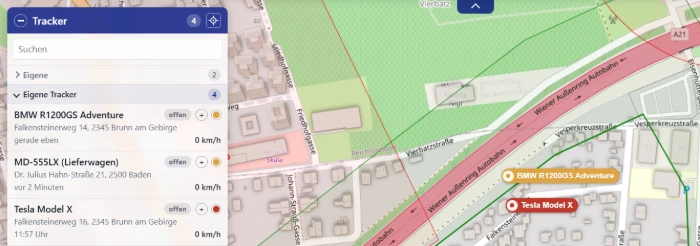
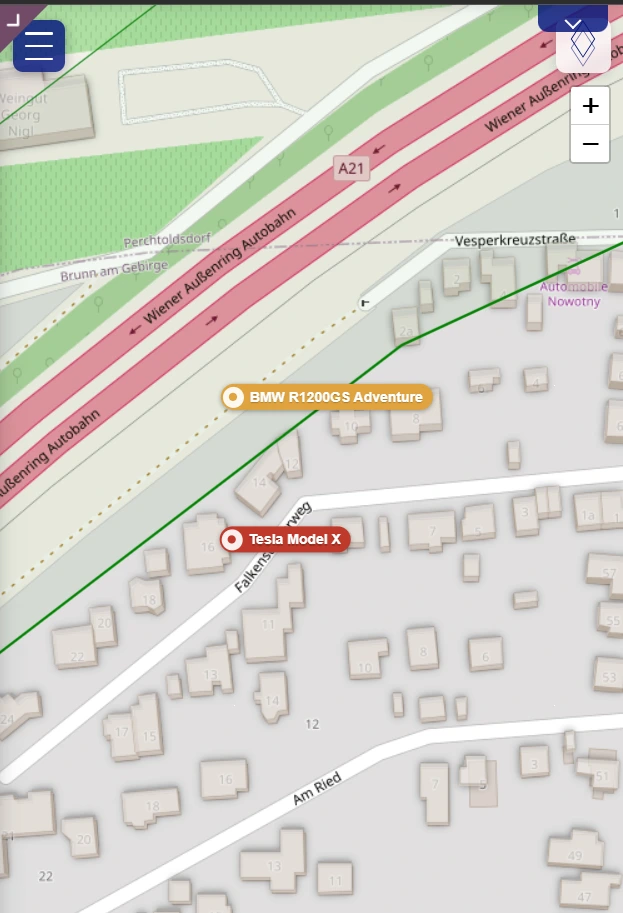
The map shows all of your own and shared vehicles with status (moving, stationary, offline), speed, direction of travel and resolved address. Positions arrive in real time via a WebSocket connection to the tracking server – a single connection for the whole installation, not one per open browser – and are distributed with filtering: each customer receives only the vehicles that belong to them or are shared with them. Vehicles move smoothly between two reports instead of jumping.
The available base maps include OpenStreetMap, a terrain map, Austria's official Basemap with aerial imagery, and a black-and-white map. Terrain and 3D buildings can be enabled as additional layers. Odoo remembers each user's initial map view, including map type, visible area and default group.
Mileage log with business and private journeys
Journeys are detected on the server, rather than in the browser: a journey is recorded even when nobody has the map open. Each journey records the start and end times, start and destination addresses, odometer reading, distance and duration.
Each journey can be classified as a business journey or a private journey. This is set per journey rather than per vehicle, because the same car may visit a customer in the morning and drive home in the evening, and the distinction matters for tax purposes in Austria. A classification window appears directly on the map when a journey starts. Those who prefer to classify it later can find the journey in the mileage log, complete with a notes field. Drivers are identified using iButton key fobs where the vehicle is equipped with them.
Two reports are available, both in PDF and Excel:
- Individual vehicle mileage log – a vehicle's journeys during the selected period, with route, classification and notes
- Fleet mileage log – one row per vehicle showing driving time, distance, a breakdown of business and private mileage, and estimated fuel consumption, plus group and overall totals
Geofences and alerts
Geofences are drawn directly on the map – as a circle, square or free polygon – or adopted from shared templates such as “Austria” or “Vienna”. For each zone and vehicle, you can specify whether an alert is triggered on entry or exit and where it goes: by SMS, email, webhook or as a message to our call centre.
Alerts for zone changes, speed, ignition, power loss, emergency calls, movement and devices going offline appear as individual records in Odoo, complete with time, location and handling status.
Search: which vehicle was here?
A speeding ticket arrives with the camera location on it, but which vehicle was involved? The route history search answers exactly that: select a point on the map or an address, specify a radius and time period, and the tracking system shows which vehicles were there. Speed camera locations from OpenStreetMap are already available as a map layer.
Customer self-service
Customers can now handle tasks in the portal that previously had to be passed to us:
- Activate trackers – enter the IMEI from the device label, select or create a group, and you are done
- Trackers and groups – names, icons, group assignments, refuelling records with quantities and prices, and reports for each vehicle
- Permissions – share vehicles with other users or companies, with read or write access and the option to hide individual fields such as address or odometer reading
- Geofences – draw, edit and configure alerts
- iButtons – assign key fobs to driver names
What has changed for us internally
The Odoo backend has a Tracking section with a live map, tracker management, alerts, journeys, master data (groups, geofences, device types and manufacturers) and billing.
Tracker management. Each device record holds its IMEI, SIM phone number, device type, inputs and outputs (ignition, immobiliser, auxiliary heater and others), calibration, odometer correction, offline threshold and mileage log parameters. Odoo's chatter history logs every change.
SMS to devices. Trackers are configured by SMS. Messages are now sent from within Odoo, fully logged and protected against user error: a limit per sending operation prevents a single click from triggering hundreds of chargeable messages, and incomplete phone numbers are rejected before submission.
Call centre. Theft and accident alerts appear as cases with vehicle details, the owner's contact details and a guided workflow: has the owner been reached? Is it a false alarm? Is further action needed? Every step is logged, and the staff responsible receive push notifications.
Billing. The billing run includes all trackers whose next billing date has been reached and creates draft invoices in Odoo, using end-customer or partner pricing. Approval deliberately remains with the accounts team: the run prepares invoices without posting them. The billing interval, product and next billing date are stored on the tracker; after the run, the invoice lines are available directly on the device record.
The architecture behind it
GPS devices
    │
    ▼
Tracking server ──►  Position data store         Odoo 19 Community
(unchanged)         today: existing             ├─ Master data (trackers, customers, geofences)
                           database              ├─ Customer portal  /my/ortung
                    later: PostGIS              ├─ Backend  Tracking / …
                                  ▲              ├─ Billing (draft invoices)
                                  └── read-only ─┘
Position data is accessed exclusively through a replaceable interface. Today, Odoo reads from the existing tracking database, which the tracking server continues to populate as before. Moving to a dedicated PostGIS server therefore requires a configuration change rather than a rebuild, with PostGIS then handling spatial calculations such as geofence checks itself. A demo data store with synthetic data is also available for development and training, allowing the module to run without a tracking server.
Addresses are resolved using our own geocoder and cached in Odoo, with coordinates rounded to roughly eleven metres. This avoids repeated address lookups for a stationary vehicle whenever GPS noise shifts its reported position, and keeps the map independent of an external service's response time.
How the migration went
We migrated gradually using the strangler pattern. The old system remained operational, a reverse proxy routed requests according to their path, and the new map initially ran alongside the old one for a pilot group.
Migrating the master data was the most delicate part. A migration script reads customers, users, trackers, groups and geofences from the old application and creates them in Odoo. It can be rerun incrementally, using the original identifier as the key. Since many tracking customers already existed as partners in Odoo, a wizard suggests matches that must be confirmed individually: linking the wrong company would let it see someone else's vehicles, which is more costly than a duplicate record.
We deliberately left some things behind: the separate desktop and mobile codebases (the Odoo frontend is responsive), the custom translation table, custom permission and session handling, and a good dozen reports that nobody used in practice any more.
What this means for you as a customer
If you are one of our tracking customers, you have either already received access to the portal or will receive it in the coming weeks. Your vehicles, groups, geofences and permissions have been transferred, and your mileage log continues seamlessly.
In one portal, you find your tracking, your invoices and your support requests. And if you want more than tracking – helpdesk, maintenance contracts, project billing – it is the same system.
We are happy to answer questions about the changeover. And if you are looking for vehicle tracking for your own company that is connected to the ERP instead of standing beside it: get in touch.